

The worst analytics failures aren't the loud ones. A dashboard that throws a red error gets fixed in an hour because somebody screams about it. The expensive failures are the quiet ones — a nightly load that half-completes, a dimension table that stops refreshing on Thursdays, a revenue metric that's been understated by 4% for three weeks because an upstream API started paginating differently and nobody wrote a check for it.
Software reliability teams solved a version of this problem a decade ago. They stopped treating "is it up?" as a yes/no question and started measuring reliability as a budget you spend. Almost none of that discipline has made it into analytics teams, even though data pipelines fail in sneakier, harder-to-detect ways than web services do. A web service that's down is obvious. A pipeline that's wrong can run green for a month.
This is the gap analytics reliability engineering fills. It's not about adopting every SRE ritual wholesale — most analytics teams don't have the headcount for a 24/7 on-call rotation and don't need one. It's about translating the primitives that actually matter — SLAs, SLOs, error budgets, toil tracking, runbooks — into artifacts that fit how data teams really work.
The translation problem: SRE primitives don't map cleanly to data
If you lift SRE concepts straight from a web-service context, they fall apart quickly. "99.9% uptime" means nothing for a batch pipeline that only runs once a day. "Latency" isn't quite the right word for data freshness. And "the service is returning 500s" has no equivalent when your failure mode is correct-looking but wrong numbers.
So the first job is honest translation. Here's how the core primitives actually map:
| SRE primitive | Web-service meaning | Analytics equivalent |
|---|---|---|
| SLA | Contractual uptime promise | Pipeline delivery promise (freshness + completeness) |
| SLO | Internal reliability target | Metric-level target: freshness, accuracy, completeness |
| SLI | The measured signal | Rows loaded, lag minutes, null rate, reconciliation delta |
| Error budget | Allowed failure before you stop shipping | Allowed staleness/incidents before you freeze changes |
| Toil | Manual repetitive ops work | Manual backfills, re-runs, hand-patched numbers |
| Runbook | Incident response steps | Investigator playbook for a specific failure class |
The mistake teams make is skipping the translation entirely and just declaring "we have SLAs now" without defining what signal they're actually measuring. An SLA you can't measure automatically is a wish. If a human has to eyeball a dashboard to decide whether the pipeline met its promise, you don't have an SLA — you have a hope and a calendar reminder.
Why pipelines fail silently in the first place
Silent failure is baked into how analytics stacks grow. Nobody designs it in on purpose. It accumulates.
Stop missing critical business insights.
Glasaly helps you create, share, and track interactive dashboards effortlessly.
- Real-time data visualization
- Collaborative report sharing
- Customizable analytics widgets
No credit card required
A typical path: early on, there's one warehouse, a handful of scheduled jobs, and the person who built them knows every edge case. Freshness isn't monitored because the builder notices when something's off. Then the team grows, the original builder moves to another project, and the jobs keep running. New sources get bolted on. A consumer-facing report starts depending on a table three hops downstream of a source nobody reviews anymore.
-
Partial loads — the job succeeds but loads 80% of the rows because a source timed out mid-extract. Row count looks "normal enough."
-
Stale-but-present data — yesterday's partition never got replaced, so the table has data, just not today's data.
-
Schema drift — an upstream column gets renamed and silently maps to null. The metric still computes; it's just quietly wrong.
-
Join fan-out — a duplicate key upstream inflates a count by 15%. Looks like a good week.
-
Timezone and watermark slips — late data lands outside the window and gets dropped without a trace.
None of these trip an error. The job exits zero. The dashboard renders. And the first person to notice is usually someone in finance or ops asking why a number "feels off" — which is the most expensive possible detection mechanism, because by then decisions have already been made on bad data.
What breaks at scale isn't any single pipeline. It's the coordination gap. Platform teams own the warehouse. Pipeline teams own the jobs. Analysts own the metrics. Consumers own the decisions. Each group assumes someone else is watching reliability, and the handoffs between them are exactly where silent failures hide.
Start with the three expectations you're actually promising
Before writing any SLO, map the three layers of expectation. These are different, and conflating them is why so many "data SLA" efforts produce documents nobody uses.
-
Platform expectations — what the infrastructure guarantees. Warehouse availability, query concurrency, scheduler reliability. If the platform is flaky, nothing above it can be reliable.
-
Pipeline expectations — what each data flow promises. "The orders table is complete and current by 7:00 AM on business days." This is where freshness and completeness live.
-
Consumer expectations — what the decision-maker actually needs. The finance team closing books at 9 AM needs orders fresh by 7. The marketing team pulling a weekly report does not.
The pattern worth internalizing: you only need reliability where a consumer expectation depends on it. Half the pipelines in a mature stack feed nothing that anyone makes a timely decision on. Putting a tight SLO on those is wasted effort and generates alert fatigue, which is how teams end up ignoring the alerts that matter.
A clean way to document this is a short mapping table per critical metric — consumer, decision, required freshness, required accuracy tolerance, upstream dependencies. Once you can see that the "daily revenue" number has four hops and a 7 AM consumer deadline, the SLOs write themselves.
Writing SLOs that mean something
An SLO needs three parts to be usable: an indicator you can measure automatically, a target, and a window. Vague SLOs ("data should be fresh") are worse than none because they create the illusion of coverage.
Here are sample definitions that have held up in practice:
Freshness SLO
> The fct_orders table will reflect all transactions through midnight by 07:00 local time on business days, 99% of business days per rolling 30-day window.
Completeness SLO
> Daily loaded row count for fct_orders will be within ±2% of the 14-day median for that weekday, 98% of runs per 30 days.
Accuracy / reconciliation SLO > Daily revenue reconciled against the source ledger will differ by no more than 0.5%, 99% of days per 30 days.
Freshness for a lower-tier table
> The marketing_attribution table will be current within 24 hours, 95% of the time. (Deliberately loose — nobody makes an hourly decision on it.)
Notice the windows are rolling and the targets aren't all 99.9%. Tiering is the whole game. A revenue reconciliation metric earns a tight target; a nice-to-have attribution table gets a loose one. If everything is tier-one, nothing is, and your team burns out chasing alerts on tables that don't matter.
If you're just getting started on the measurement side, the groundwork in an SLO framework for metrics and data-quality covers how to instrument these indicators before you commit to targets you can't track.
Error budgets: the part everyone skips
This is the primitive that actually changes behavior, and the one analytics teams almost always leave out. An SLO without an error budget is just a report card. The error budget is what connects reliability to decisions about shipping changes.
If your freshness SLO is 99% of business days over 30 days, your error budget is roughly one allowed miss per month (1% of ~21 business days). That budget is a currency. When it's intact, the team ships freely — new models, refactors, source additions. When it's spent, you freeze non-essential changes to that pipeline until reliability recovers.
This does two things. It gives analysts a concrete, non-political reason to slow down when a pipeline is fragile ("we're out of budget" beats "I feel nervous about this"). And it gives the team permission to not obsess over reliability when the budget is healthy — you're allowed to move fast and occasionally break things, as long as you stay within budget.
A real example of how this reframes a conversation: a mid-sized ecommerce analytics team was fighting constantly about whether to pause model changes during their busy season. No one could agree. After defining an error budget on their three finance-facing tables, the argument dissolved. They'd burned about 60% of the quarter's budget on two incidents in six weeks. The data made the call — freeze the finance pipelines, keep shipping on everything else. The debate went from opinion to arithmetic.
Automated mitigation recipes
Detection without response just means you find out about failures faster. The point of borrowing SRE discipline is to attach automatic responses to common, well-understood failure classes — so humans only get pulled in for the genuinely novel stuff.
-
Partial load detected (row count below completeness threshold) → hold the publish step, keep yesterday's good partition live, alert the pipeline owner. The key move: don't overwrite good data with bad data. A stale-but-correct table beats a fresh-but-broken one almost every time.
-
Freshness breach (table not updated by deadline) → trigger one automatic re-run, and only page a human if the re-run also fails. A large share of freshness misses are transient and self-heal on a retry.
-
Reconciliation drift (revenue delta exceeds tolerance) → flag the downstream dashboard with a "data under review" banner and notify the metric owner before consumers pull it. Surfacing uncertainty to consumers is itself a mitigation.
-
Schema drift (expected column missing or retyped) → fail loudly and block the load rather than mapping to null. This is the one case where failing hard is correct.
The discipline these recipes depend on — staging changes, fast verification before publish, clean rollback — overlaps heavily with how disciplined teams handle deployments. The patterns in scheduled releases, fast smoke checks and rollback recipes analysts can run are the natural companion here: mitigations work best when every change is reversible.
Here's a simple visual workflow for common mitigation recipes.
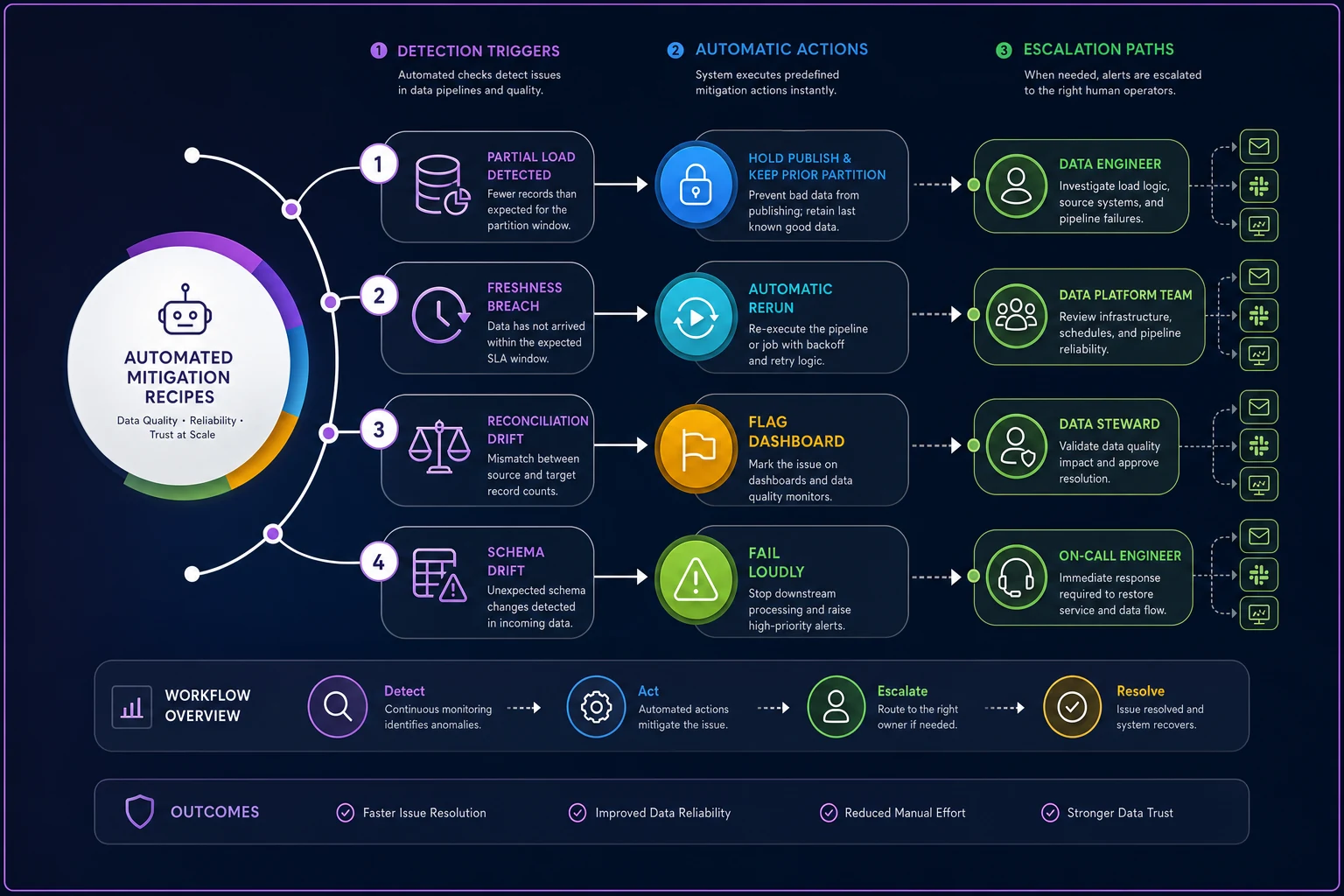
Use scheduled releases and fast smoke checks so mitigations can run reliably and changes are reversible.
Tracking toil so it doesn't eat the team
Toil is the manual, repetitive, reactive work that keeps pipelines running but produces nothing new. Hand-running a failed backfill. Patching a number before the Monday meeting. Explaining to the same stakeholder for the fifth time why the report is late.
Most analytics teams never measure this, which is why it quietly consumes half their week. The fix is embarrassingly simple: log every manual intervention with a category and a rough time cost. After a month you'll have a toil inventory, and the pattern almost always jumps out — one or two pipelines generating the majority of the manual work.
-
Date and pipeline/metric affected
-
Intervention type (re-run, backfill, manual patch, stakeholder explanation)
-
Rough time spent (15-minute buckets are fine)
-
Was it preventable? (yes/no/maybe)
The reason to track toil isn't guilt. It's prioritization. When you can show that the attribution pipeline ate roughly 11 hours of manual re-runs last month, the case to invest a day automating its retry logic makes itself. Without the log, that work never gets prioritized because it's invisible — absorbed into "that's just how the job is."
Use 15-minute buckets for rough time estimates so logging remains quick and accurate.
A useful rule borrowed straight from SRE: if toil on a single pipeline exceeds some threshold of your team's time, that's a signal to stop patching and fix the root cause. Even "more than 2 hours a week on one pipeline" is enough to trigger an investment conversation.
Runbook templates that an investigator can actually follow
A runbook is only useful if someone unfamiliar with the pipeline can follow it at 7 AM under pressure. Most "runbooks" fail this test because they were written by the person who built the pipeline and assume knowledge only that person has.
A good investigator runbook is organized by symptom, not by system, because the person responding starts with a symptom ("revenue looks low"), not a diagnosis.
Symptom: Daily revenue is lower than expected
-
Confirm the symptom — compare today's figure to the 14-day weekday median. Is the delta beyond normal variance? (Query provided inline.)
-
Check freshness first — is the table actually current, or are we looking at stale data? (Check the load timestamp.)
-
Check completeness — row count vs. expected range. A low count points to a partial load.
-
Check the top upstream dependency — did the source extract complete? When did it last succeed?
-
Check for duplicate keys — a sudden high number often means fan-out, not a good day.
-
If none of the above — escalate to the metric owner with the findings from steps 1–5 attached.
The best runbooks include the actual diagnostic queries inline, name a specific owner for escalation, and get updated after every incident. That last part matters most — a runbook that isn't revised after a novel incident is a runbook slowly going stale. The investigation mindset that makes these effective is the same one covered in the broader operational analytics compliance framework that makes audits routine, where documented, repeatable response is the whole point.
When this is worth it — and when it isn't
Reliability engineering has real overhead. It's not free, and applying it everywhere is its own mistake.
When it makes sense:
-
You have metrics that drive timely, consequential decisions (finance close, inventory, anything customer-facing).
-
Multiple teams depend on the same pipelines and the handoffs are murky.
-
You've had at least one expensive silent failure. (Most teams don't take this seriously until they have.)
When it's a bad idea:
-
You have three pipelines and one person who knows all of them. The overhead will exceed the benefit — your "monitoring" is that person, and that's fine for now.
-
Your data is purely exploratory and nobody makes operational decisions on a deadline.
-
You'd be setting SLOs you can't measure automatically. A manual SLO is theater.
Who should not start here: teams without basic observability in place. You can't set an error budget on freshness if you aren't already measuring freshness. Instrument first, target second. Starting with SLO documents before you have signals produces a binder nobody reads.
A short real scenario
A regional logistics company's analytics team — four people — supported an operations dashboard that dispatchers used to balance loads each morning. The dashboard depended on a telematics feed that, a few times a month, would load incomplete. Nobody caught it until dispatchers complained that truck utilization "looked wrong," usually around 10 AM — well after morning planning had already been done on bad numbers.
They did the minimum viable version of this. Defined one completeness SLO on the telematics table (row count within range of the weekday median), wired a single automated check that held the dashboard publish and kept the prior day's data live when the count came in low, and wrote a one-page runbook for the dispatch team to check a freshness badge before planning.
The change wasn't dramatic in effort — maybe three days of work. Silent incidents reaching dispatchers dropped from several a month to nearly none, because bad loads now got caught and held before 7 AM instead of surfacing as confused complaints at 10. The manual morning scramble to re-run and re-explain mostly disappeared. Nobody built a 24/7 on-call rotation. They just translated a few SRE primitives into artifacts that fit a four-person team.
The point isn't to become an SRE team
Once you start reading about reliability engineering, the temptation is to adopt all of it — the ceremonies, the full on-call rotation, the elaborate dashboards. Resist that. The teams that actually get value from analytics reliability engineering are the ones that borrow selectively: measurable SLOs on the metrics that matter, error budgets to govern when to slow down, automated mitigations for the failures you already understand, a toil log to decide what to fix next, and runbooks a stranger could follow.
Start with your single most consequential metric. Define one freshness or completeness SLO you can actually measure. Attach one automated mitigation so a bad load can't silently overwrite a good one. Then expand only where a real consumer expectation justifies it. The goal isn't reliability for its own sake — it's making sure that when a pipeline fails, you find out before your decision-makers do.
Start with your single most consequential metric. Define one freshness or completeness SLO you can actually measure. Attach one automated mitigation so a bad load can't silently overwrite a good one. Then expand only where a real consumer expectation justifies it. The goal isn't reliability for its own sake — it's making sure that when a pipeline fails, you find out before your decision-makers do.
Ready to elevate your business intelligence?
Join 2,500+ businesses leveraging Glasaly to drive smarter decisions, improve team alignment, and boost operational performance.