

There's a specific kind of Tuesday that data teams learn to dread. Someone pushes a "small" change to a transformation model at 3pm, the nightly load runs at 2am, and by 8am the revenue dashboard is showing a 40% drop that turns out to be a join fanning out because of a duplicated dimension key. Nobody's sure who changed what. The person who made the change is asleep. Three department heads are asking why their numbers are wrong.
That failure mode isn't really about the bad join. It's about the fact that ETL changes go out whenever, get validated by nobody in particular, and have no agreed way to be undone by someone who isn't the original author. This post is about fixing exactly that — how analysts can run pipeline releases inside defined windows, verify them fast, and roll them back without paging engineering.
The real problem: release timing is invisible, so failures land at the worst moment
Most analytics teams don't have a release process. They have a habit. Changes ship continuously, tied to whenever someone finishes their work, and the actual "deployment" is a merge that silently gets picked up by the next scheduled run.
This feels fine for a while because pipelines are forgiving right up until they aren't. A model change that's wrong in a subtle way — a filter that now excludes returns, a currency conversion applied twice, a timezone shift on event timestamps — doesn't crash anything. It just produces numbers that are quietly off. And because there's no window, no smoke check, and no snapshot from before the change, nobody notices until a stakeholder does the noticing for you.
Why "just be careful" doesn't scale
The instinct is to tell people to review more carefully. That doesn't work, and it's worth being honest about why.
Stop missing critical business insights.
Glasaly helps you create, share, and track interactive dashboards effortlessly.
- Real-time data visualization
- Collaborative report sharing
- Customizable analytics widgets
No credit card required
-
Reviewers can't see downstream impact. A PR that changes one model looks fine in isolation. The problem shows up three joins later in a mart nobody thought to check.
-
The person reviewing rarely runs the pipeline. They're reading SQL, not looking at output rows. A logically valid query can still be operationally wrong.
-
Changes bunch up. Friday afternoon merges, end-of-quarter rushes, five changes landing together so you can't tell which one broke the number.
Careful people still ship broken pipelines. The fix isn't more discipline — it's a lightweight structure that makes timing predictable and verification automatic.
Scheduled change windows: the boring habit that prevents most fires
A change window is just an agreed time when ETL changes are allowed to go live, plus a matching quiet period when they aren't. It sounds bureaucratic. In practice it's the single highest-leverage thing a small data team can adopt, because it turns "a failure could happen any time" into "if something broke, it broke in the last two hours and we know which changes went out."
A window that actually works for analyst-run pipelines usually looks something like this:
| Element | Loose setup (chaos) | Windowed setup (calm) |
|---|---|---|
| When changes go live | Whenever a merge lands | Tue & Thu, 10am–12pm only |
| Who's watching | Nobody in particular | Whoever owns that window |
| Freeze periods | None | Month-end close, last day of quarter |
| Failure blast radius | Could be days old | Bounded to the last window |
| Rollback context | "Who changed what?" | A short, dated release list |
Two things make this practical instead of annoying. First, put the window in the morning, not end of day — you want humans awake and dashboards being watched when the change lands. Second, freeze the calendar around anything high-stakes: close week, quarter-end, the day before a board meeting. Most bad surprises happen when someone ships "one small fix" during exactly the week nobody can afford a wrong number.
Put the window in the morning, not end of day — you want humans awake and dashboards being watched when the change lands.
When windows are a bad idea
They're not free. If your team ships fewer than a couple of changes a week, a formal window is overhead you don't need — informal coordination works fine. And if you have genuine emergency fixes (a source dropped a column and the whole load is failing), you need an explicit break-glass path so windows don't block urgent repairs. The rule of thumb: windows govern planned changes, not incident response.
Fast smoke checks analysts can actually run
A change window without verification just means your failures are punctual. The window needs a smoke check — a small, fast set of assertions that runs right after the release and tells you within a few minutes whether the core numbers are sane.
The mistake people make here is trying to validate everything. A smoke check is not full data-quality coverage. It's the three-to-six checks that would have caught the last several outages. Think of it as the "did we obviously break something" test, not the "is every row perfect" test.
-
Row-count sanity. Did the main fact table land within, say, ±15% of yesterday's count? A load that produced 400 rows instead of 40,000 is caught instantly.
-
No unexpected nulls in key columns. Order ID, customer ID, amount — if these suddenly go null, a join or rename broke.
-
Grain check. Is the table still one row per order? A duplicated dimension key that fans out a join shows up as a count that doubled.
-
A pinned total. Take one known number — yesterday's total revenue, or last week's order count — and assert the pipeline still reproduces it. This catches double-counting and dropped filters better than almost anything else.
-
Freshness. Did the data actually update, or are you looking at a stale table that silently failed to load?
The freshness and null checks overlap heavily with the recipes in automating transactional data quality, and it's worth reusing that machinery rather than building a parallel system — the smoke check is just a smaller, faster subset that runs at release time specifically.
Keep it small on purpose. If the smoke check takes 20 minutes, nobody runs it during a two-hour window. If it runs in two or three minutes and posts a green/red result to a channel, it becomes a natural part of the release instead of something people skip under pressure.
Tie the checks to SLOs, not to gut feel
The subtle part: "±15%" and "revenue matches yesterday" are arbitrary until you connect them to what actually matters. The threshold for a smoke check should come from a service level objective, not from whatever number felt reasonable that afternoon.
If your SLO says the revenue metric must be accurate within 2% and fresh by 9am, then your smoke check thresholds fall out of that directly — the pinned-total check tolerates 2%, the freshness check fails anything landing after 9am. This is where release governance stops being a separate discipline and starts being the enforcement arm of the observability targets you already set. If you haven't defined those targets yet, the SLO framework for analyst observability is the piece that makes your smoke thresholds defensible instead of made up.
The pattern that keeps showing up: teams that set SLOs but don't gate releases against them end up with beautiful dashboards showing that data quality has been degrading for three weeks. The observability signal existed. Nothing acted on it at the moment a change went out.
Rollback recipes: the part everyone skips
Detection without a rollback is just a faster way to feel bad. The reason analysts hesitate to own releases is that when something breaks, the fix requires engineering — reverting code, rerunning loads, untangling dependencies. So the whole thing feels risky to touch.
The fix is to write rollback recipes in advance: short, specific, copy-pasteable procedures that a non-engineer can run when a smoke check goes red. Not a general "revert the change" wish — an actual named recipe per failure type.
-
Revert-and-rerun. The change was in a transformation model. Recipe: revert the model to the last tagged good version, trigger a rerun of that model and its immediate downstream, re-run the smoke check. No source data touched.
-
Point-to-last-good snapshot. The mart is corrupted but you have yesterday's snapshot. Recipe: repoint the dashboard's source to the last known-good snapshot table while the fix is worked out, so stakeholders see stale-but-correct instead of fresh-but-wrong.
-
Freeze-in-place. You can't safely revert yet. Recipe
disable the scheduled load for that pipeline, post a banner on affected dashboards, buy time without producing more bad rows.
-
Partial reprocess. Only one day's partition is bad. Recipe
delete and reload that specific partition rather than a full historical rebuild.
The "point to last-good snapshot" recipe matters more than it might seem, because it separates stop the bleeding from fix the root cause. A wrong-but-fresh dashboard erodes trust every minute it's up. A stale one with a note that says "showing yesterday's data, fix in progress" holds trust surprisingly well. Analysts can run the repoint. They usually cannot debug the root cause under pressure — and they shouldn't have to be expected to, in the moment.
Who should not run rollbacks
Be realistic about the boundary. An analyst can run a pre-written recipe. An analyst should not be improvising a rollback on a pipeline with tangled downstream dependencies and no snapshots. If your pipeline has no versioned models and no snapshots to fall back to, build those first — the recipes assume they exist. Handing someone a rollback playbook for a system that can't actually roll back is worse than no playbook, because it creates false confidence.
A real scenario
A mid-sized ecommerce operation — roughly $6M in annual revenue, one full-time analyst and a part-time contractor handling the heavier engineering work — was shipping model changes continuously. Over about three months they had four separate incidents where a wrong number reached a stakeholder before anyone caught it. The worst was a double-counted returns adjustment that overstated net revenue for five days and fed into a reorder decision.
They didn't hire anyone. They set a Tuesday/Thursday 10am window, wrote a five-assertion smoke check (row count, null keys, order grain, pinned weekly revenue, freshness), and documented three rollback recipes: revert-and-rerun, repoint-to-snapshot, and freeze-in-place.
Over the next quarter they shipped roughly the same number of changes as before. Incidents that reached a stakeholder dropped to one — and that one was caught by the smoke check and rolled back via the snapshot recipe in under 15 minutes, before anyone downstream saw it. The analyst ran that rollback herself. No engineer, no 2am page. The contractor's time shifted from firefighting to actual pipeline work.
The interesting part wasn't the tooling. It was that the window gave them a bounded blast radius, the smoke check gave them fast detection, and the recipes gave the analyst permission to act.
Putting it together as a workflow
Once you have the window, the smoke checks, and the rollback recipes in place, the actual release loop is pretty straightforward. A change queues up, waits for window day, and then runs through a short decision chain that either closes cleanly or kicks back to a pre-written fix. The whole thing is designed to be repeatable without anyone having to think too hard under pressure.
The diagram below shows the release loop in sequence.
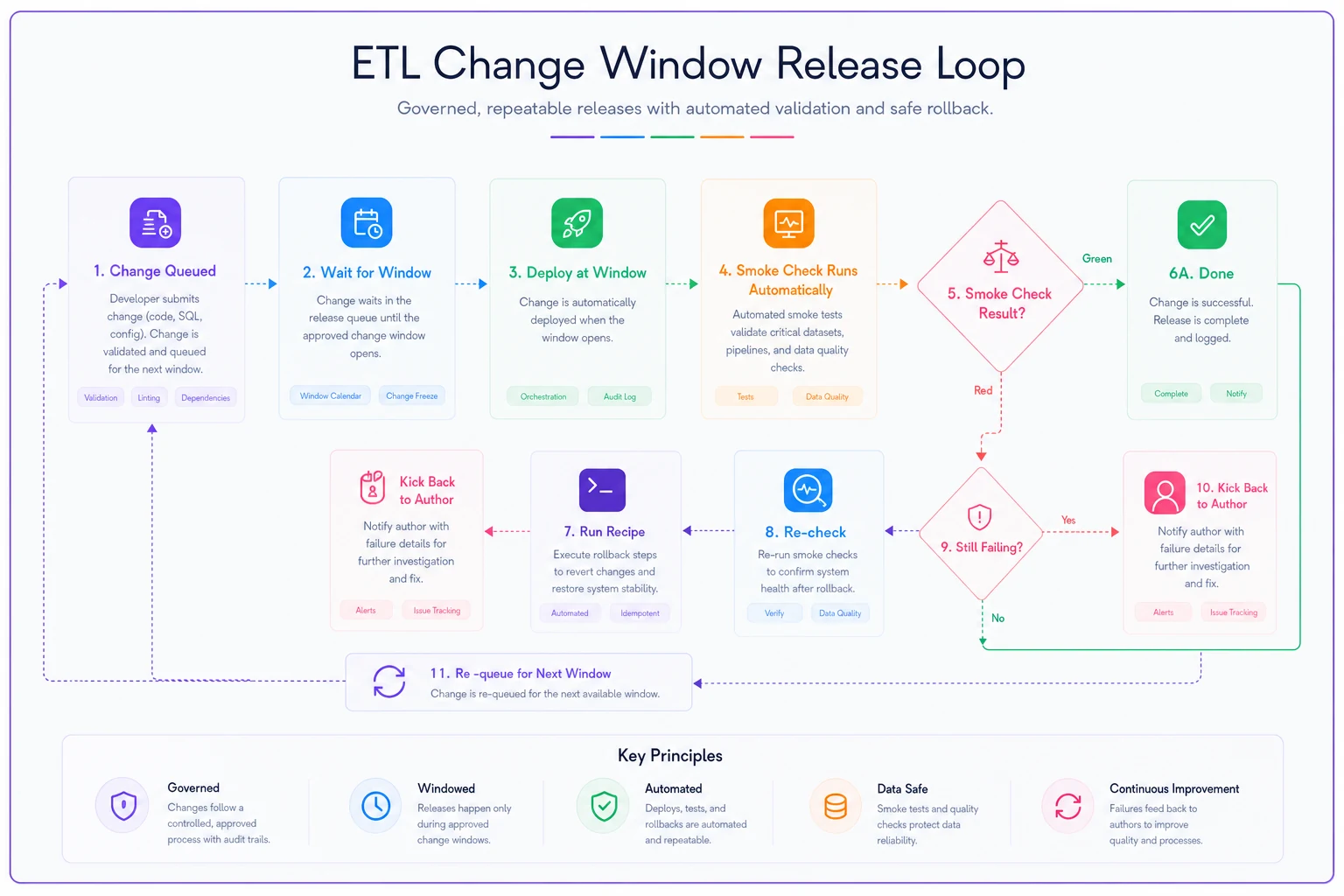
The sequence runs as a simple loop. A change is ready. It waits for the next window instead of shipping on merge. At 10am on window day, the owner deploys the queued changes — often several at once, which is fine because they're all going out together and getting checked together. The smoke check runs automatically right after the load.
Green: the window closes, done. Red: the owner opens the rollback recipe library, picks the recipe matching the failure (grain check failed → likely a fanned join → revert-and-rerun; total mismatch that can't wait → repoint-to-snapshot), runs it, and re-checks. The bad change gets kicked back to the author to fix and re-queue for the next window.
That loop is boring by design. Boring is the goal. The teams that get burned are the ones running exciting, unpredictable, whenever-it's-ready releases.
Where this connects to your existing governance
None of this replaces your data-quality checks, your metric version control, or your observability dashboards — it sits on top of them and gives them a moment to act. The SLOs define what "correct" means. The data-quality recipes define the checks. Change windows decide when changes are allowed to test that correctness, and rollback recipes decide what an analyst does when a check fails.
If you already have observability and quality checks in place but changes still cause fire drills, the missing piece is almost always the release layer: no window, no smoke gate at deploy time, no pre-written way to undo. That's the specific gap this closes.
The takeaway
Predictable releases aren't about slowing your team down — they're about making failures small, recent, and reversible by the people closest to the data. A morning change window bounds the damage. A five-check smoke test catches the obvious breaks in minutes. SLO-aligned thresholds keep those checks honest. And a short library of rollback recipes means an analyst can stop the bleeding without waiting on engineering.
Start with one pipeline. Pick a window, write three smoke checks and two rollback recipes, and run it for a month. You'll spend less time explaining wrong numbers to stakeholders, which is most of what this is really about.
Ready to elevate your business intelligence?
Join 2,500+ businesses leveraging Glasaly to drive smarter decisions, improve team alignment, and boost operational performance.