


Your monthly revenue report shows a 47% spike. Everyone's celebrating until someone realizes the payment processor double-posted $82,000 in transactions last Tuesday. Now you're explaining to the board why the numbers they saw three days ago were completely wrong.
This scenario plays out more often than anyone wants to admit. Transaction-level data problems lurk in the shadows until they explode during a critical report or audit. By then, you've already made decisions on corrupted data, sent incorrect invoices, and maybe even filed incorrect tax documents.
The real operational challenge isn't just detecting bad transactional data — it's building a system that catches these issues automatically, triggers the right remediation workflows, and tracks who fixed what and when. Most businesses try to solve this with spreadsheet checks and manual reviews that crumble the moment transaction volume increases.
Why transaction sanity checks fail at scale
Traditional data quality approaches treat transactions like they're all the same. Run some basic validation rules, flag outliers, move on. But real transactional data has context that generic checks miss completely.
A $15,000 wholesale order might be normal for your B2B channel but would signal fraud in retail. A customer placing 8 orders in one day could be bulk buying for an event or could indicate a payment loop error. Without context-aware checks, you're either drowning in false positives or missing real problems.
The scheduling piece makes it worse. Different transaction types need different check frequencies. Payment reconciliations need to run every few hours during business days. Inventory adjustments might only need daily checks. Customer data updates could run weekly. Most teams end up with a mess of scheduled queries that nobody remembers why they exist or what happens when they fail.
Then there's the handoff problem. Your automated check finds duplicate transactions. Great. Now what? Who gets notified? How do they investigate? Where do they document the fix? Without clear remediation workflows, you're just creating noise that everyone learns to ignore.
Building context-aware transaction checks
Start with transaction velocity patterns. Normal business has rhythms — busy lunch hours for restaurants, end-of-month spikes for B2B, weekend peaks for e-commerce. Your checks need to understand these patterns to avoid flagging normal variation as problems.
Stop missing critical business insights.
Glasaly helps you create, share, and track interactive dashboards effortlessly.
- Real-time data visualization
- Collaborative report sharing
- Customizable analytics widgets
No credit card required
Here's a velocity check that adapts to your business patterns:
WITH hourlybaseline AS ( SELECT EXTRACT(DOW FROM transactiontime) as dayofweek, EXTRACT(HOUR FROM transactiontime) as hourofday, COUNT() as transactioncount, AVG(amount) as avgamount, STDDEV(amount) as stddevamount FROM transactions WHERE transactiontime >= NOW() - INTERVAL '30 days' AND transactiontime < NOW() - INTERVAL '1 day' GROUP BY 1, 2 ), currenthour AS ( SELECT COUNT() as currentcount, AVG(amount) as currentavg, MAX(amount) as maxamount FROM transactions WHERE transactiontime >= NOW() - INTERVAL '1 hour' ) SELECT CASE WHEN ch.currentcount > hb.transactioncount + (3 SQRT(hb.transactioncount)) THEN 'ALERT: Unusual transaction volume' WHEN ch.maxamount > hb.avgamount + (4 hb.stddevamount) THEN 'ALERT: Unusual transaction amount' ELSE 'Normal' END as status, ch.currentcount, hb.transactioncount as expectedcount, ch.currentavg, hb.avgamount as expectedavg FROM currenthour ch CROSS JOIN hourlybaseline hb WHERE hb.dayofweek = EXTRACT(DOW FROM NOW()) AND hb.hourof_day = EXTRACT(HOUR FROM NOW());
This query compares current transaction patterns against historical baselines for the same day and hour, accounting for natural business cycles. Velocity is just the start though.
Duplicate detection needs more sophistication than matching transaction IDs. Payment processors sometimes retry failed transactions with new IDs. Customers accidentally submit orders twice. Integration errors create phantom transactions. Here's a more intelligent duplicate check:
WITH potentialduplicates AS ( SELECT t1.transactionid as trans1, t2.transactionid as trans2, t1.customerid, t1.amount, t1.transactiontime as time1, t2.transactiontime as time2, ABS(EXTRACT(EPOCH FROM (t2.transactiontime - t1.transactiontime))) as secondsapart FROM transactions t1 JOIN transactions t2 ON t1.customerid = t2.customerid AND t1.amount = t2.amount AND t1.transactionid < t2.transactionid AND t2.transactiontime BETWEEN t1.transactiontime AND t1.transactiontime + INTERVAL '5 minutes' WHERE t1.transactiontime >= NOW() - INTERVAL '24 hours' ) SELECT trans1, trans2, customerid, amount, secondsapart, CASE WHEN secondsapart < 30 THEN 'HIGHPROBABILITYDUPLICATE' WHEN secondsapart < 120 THEN 'POSSIBLEDUPLICATE' ELSE 'REVIEWNEEDED' END as duplicaterisk FROM potentialduplicates ORDER BY secondsapart;
Cross-reference checks catch mismatches between related data. An order marked as shipped but payment still pending. Inventory deducted but no corresponding sale recorded. Customer address changed but old address still on recent orders. These inconsistencies compound into bigger problems if not caught quickly.
Intelligent scheduling patterns
Not all checks should run on the same schedule. Payment reconciliation might need to run every hour during business hours but can slow down overnight. Inventory checks might intensify before reorder points. Customer data validation might only need weekly runs unless you're in a migration or integration period.
| Check Category | Frequency | Business Hours | Off Hours | Examples |
|---|---|---|---|---|
| Critical Financial | 15-30 minutes | Every 15 min | Every 30 min | Payment reconciliation, duplicate detection |
| Operational Health | 2-4 hours | Every 2 hours | Every 4 hours | Inventory verification, order status |
| Compliance & Audit | Daily | 8 AM | 6 AM | Tax calculations, data retention |
| Trend Analysis | Weekly | Mondays 9 AM | - | Customer behavior, pricing changes |
The key is making schedules adaptive. During Black Friday, you might promote inventory checks to critical tier. During system migrations, data consistency checks might run every hour instead of daily. Your scheduling system needs to handle these temporary escalations without creating permanent noise.
Here's a scheduling table structure that tracks both regular and escalated schedules:
CREATE TABLE checkschedules ( checkname VARCHAR(100), checktype VARCHAR(50), baseschedule VARCHAR(20), -- '15 minutes', 'hourly', 'daily' activeschedule VARCHAR(20), escalationreason TEXT, escalationexpires TIMESTAMP, lastrun TIMESTAMP, nextrun TIMESTAMP, failurecount INT DEFAULT 0, alert_threshold INT DEFAULT 3 );
Pro-tip: increase check frequency automatically during known high-traffic events (sales, migrations) to avoid missing transient failures.
Build scheduling tiers based on business impact and data velocity. Critical financial checks run every 15-30 minutes. Operational health checks every 2-4 hours. Compliance and audit checks daily. Trend analysis weekly.
Provenance tracking that actually helps
When something breaks, you need to know exactly what happened. Not just "data was bad" but which system generated it, when it arrived, what transformations happened, and who or what made decisions along the way.
Most provenance tracking fails because it captures too much useless detail or not enough useful context. You don't need every single field change logged, but you absolutely need to know when critical fields were modified and by what process.
Build provenance tracking into your transaction pipeline:
CREATE TABLE transactionprovenance ( transactionid UUID, eventtimestamp TIMESTAMP, eventtype VARCHAR(50), -- 'created', 'validated', 'modified', 'flagged' sourcesystem VARCHAR(100), actor VARCHAR(100), -- user, system process, or integration name changes JSONB, -- what actually changed validationresults JSONB, -- which checks passed/failed remediationstatus VARCHAR(50), notes TEXT ); -- Example provenance entry for a flagged duplicate INSERT INTO transactionprovenance VALUES ( 'transabc123', NOW(), 'flagged', 'duplicatedetectionjob', 'systemscheduler', '{"flagtype": "duplicate", "confidence": 0.92, "matchedtransaction": "transxyz789"}', '{"duplicatecheck": "failed", "amountcheck": "passed", "customercheck": "passed"}', 'pending_review', 'Auto-flagged by duplicate detection. Same customer, amount, and timestamp within 45 seconds.' );
This structure lets you reconstruct exactly what happened to any transaction. More importantly, it helps identify patterns in data problems. Maybe all duplicate transactions come from a specific payment gateway during high-traffic periods. Maybe validation failures spike when a particular third-party integration runs.
Remediation workflows that close the loop
Finding bad data is only useful if someone actually fixes it. Remediation usually falls into a black hole of Slack messages, emails, and spreadsheets that nobody tracks.
Build explicit remediation handoffs into your checks. When a check fails, it should automatically create a remediation task with clear ownership, expected resolution time, and escalation paths.
Here's a remediation workflow table that tracks issues from detection to resolution:
CREATE TABLE remediationtasks ( taskid UUID PRIMARY KEY, checkname VARCHAR(100), severity VARCHAR(20), -- 'critical', 'high', 'medium', 'low' detectedat TIMESTAMP, transactionids TEXT[], -- affected transactions assignedto VARCHAR(100), assignedat TIMESTAMP, dueby TIMESTAMP, status VARCHAR(50), -- 'new', 'investigating', 'fixing', 'validating', 'complete' resolutionnotes TEXT, resolvedat TIMESTAMP, resolvedby VARCHAR(100), downstreamimpacts JSONB -- what reports/systems were affected );
But tables aren't enough. You need clear handoff rules. A critical payment mismatch goes straight to finance ops. Inventory discrepancies route to warehouse managers. Customer data issues go to support leads. Each team needs different context and different tools to investigate and fix issues.
The handoff should include specific transactions affected, business impact, suggested investigation steps, links to relevant dashboards, and escalation timelines.
Sample detection and remediation workflow
Complete example: You run an e-commerce platform processing around 1,200 orders daily. Your payment processor occasionally has timeout issues that create partial transactions — the payment goes through but the order doesn't complete.
First, detect orphaned payments:
WITH orphanedpayments AS ( SELECT p.paymentid, p.customerid, p.amount, p.paymenttime, p.processorreference FROM payments p LEFT JOIN orders o ON p.paymentid = o.paymentid WHERE p.paymenttime >= NOW() - INTERVAL '4 hours' AND p.status = 'completed' AND o.orderid IS NULL AND p.paymenttime < NOW() - INTERVAL '10 minutes' -- grace period ) SELECT paymentid, customerid, amount, paymenttime, 'Completed payment without corresponding order' as issue, 'HIGH' as severity FROM orphanedpayments;
When this check finds orphaned payments, it triggers a remediation workflow:
-
Immediate notification to the orders team with payment details
-
Customer lookup to check for incomplete cart sessions
-
Order reconstruction from payment metadata if possible
-
Manual order creation if automatic reconstruction fails
-
Customer notification once order is created
-
Root cause logging to track patterns
The remediation task automatically escalates if not resolved within 2 hours (customer might notice the charge without an order confirmation).
Complete remediation tracking query:
-- Create remediation task when orphaned payment detected INSERT INTO remediationtasks ( taskid, checkname, severity, detectedat, transactionids, assignedto, dueby, status ) SELECT genrandomuuid(), 'orphanedpaymentcheck', 'HIGH', NOW(), ARRAYAGG(paymentid), CASE WHEN SUM(amount) > 500 THEN 'seniorops' ELSE 'opsteam' END, NOW() + INTERVAL '2 hours', 'new' FROM orphanedpayments GROUP BY customer_id;
The diagram shows the detection-to-remediation flow and handoff points.
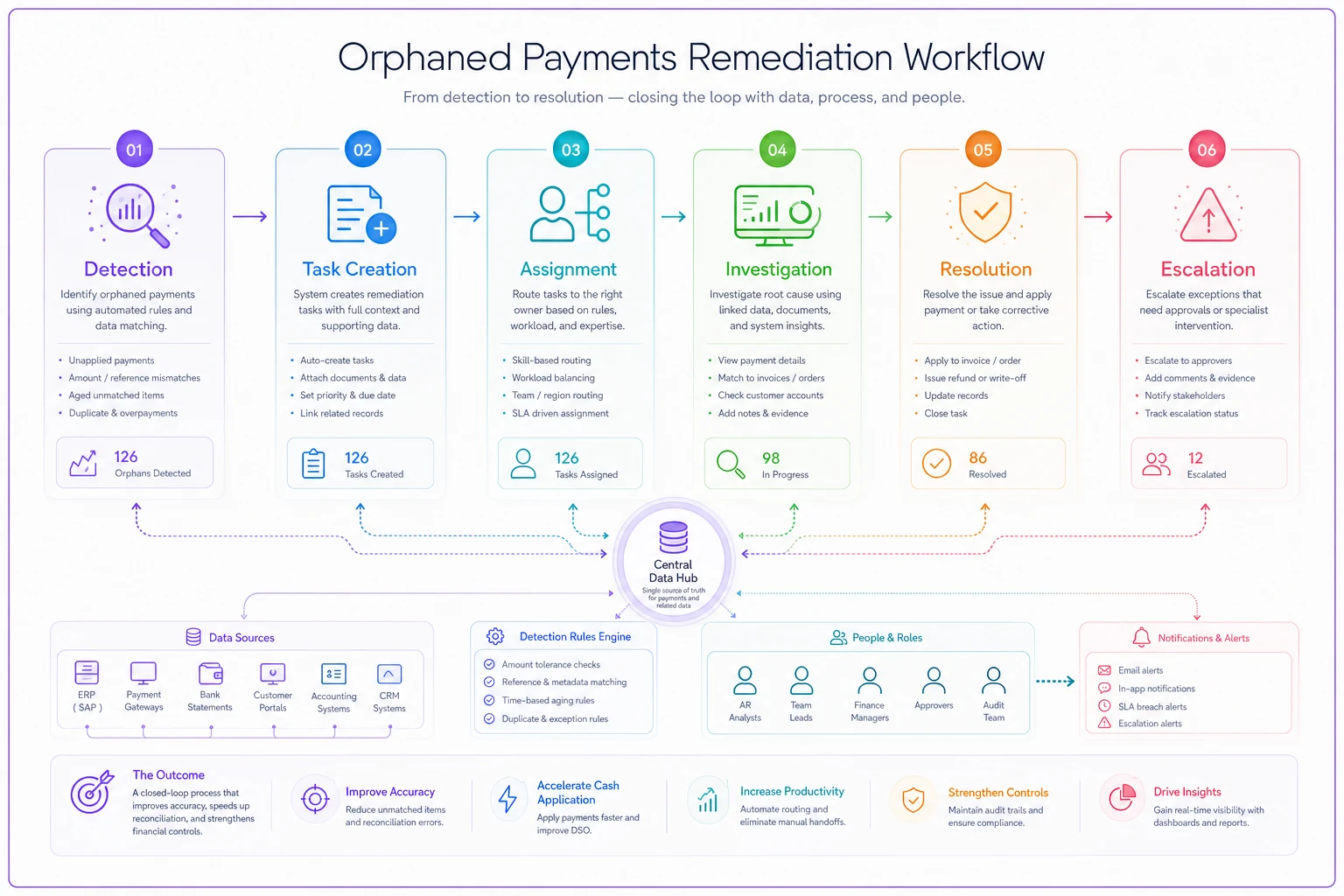
This example ties detection, task creation, assignment, and escalation into an audit-able trail so you can measure resolution times and root causes.
Operational patterns across different business types
Different industries have distinct data quality patterns.
Retail and e-commerce operations obsess over payment-inventory synchronization. Every sale should deduct inventory. Every refund should adjust it back. Every shipped order should have tracking. These businesses need checks that run frequently during business hours and can handle huge volume spikes during sales events.
SaaS and subscription businesses focus on billing-usage alignment. Customers upgraded but still being charged the old amount. Usage exceeding plan limits without upgrades. Cancelled subscriptions still granting access. These checks might run daily but need sophisticated logic to handle prorations, trials, and complex billing cycles.
Service businesses care about booking-payment coordination. Appointments scheduled without deposits. Services completed without final payment. Cancellations without refund processing. These checks need to understand business rules that vary by service type, customer tier, and time windows.
Manufacturing and distribution prioritizes order-inventory-fulfillment alignment. Orders accepted without inventory. Shipments without invoices. Returns without inspection. These businesses need checks that span multiple systems and can handle complex multi-step workflows.
Making it operational with AI-powered automation
The challenge with all these checks and workflows is that they create their own operational burden. Someone has to write the queries, update the schedules, review the results, and manage the remediation tasks. This overhead is exactly why many businesses give up on systematic data quality and go back to reactive firefighting.
AI-powered operational software changes the game here. Instead of manually writing every check, the system can learn your transaction patterns and suggest relevant validations. Instead of static schedules, it can dynamically adjust check frequency based on transaction volume and error rates. Instead of generic remediation workflows, AI can route issues based on historical resolution patterns and current team capacity.
An AI system monitoring your transaction data might notice that refunds spike every Monday morning and automatically schedule more frequent payment reconciliation checks for that period. It might detect that certain types of data issues are always resolved the same way and suggest automating that remediation. It might identify that errors from a specific integration always require the same three-step investigation and build that into the handoff.
The operational software becomes a quality control system that learns and adapts to your specific business patterns. It's not replacing human judgment — it's eliminating the repetitive work of writing checks, managing schedules, and routing issues so your team can focus on actually fixing problems and improving processes.
Building your implementation roadmap
Start small and expand systematically. Don't try to implement every check at once or you'll drown in alerts nobody investigates.
Week 1-2: Foundation Pick your highest-impact transaction type (usually payments or orders). Implement basic duplicate detection and reconciliation checks. Run them manually first to tune thresholds and understand patterns.
Week 3-4: Scheduling Move your proven checks to automated schedules. Start with daily runs, then increase frequency for critical checks. Build a simple alerting system — even if it's just emails to start.
Week 5-6: Remediation Create remediation workflows for your most common issues. Define clear ownership and escalation paths. Start tracking resolution times and patterns.
Week 7-8: Expansion Add checks for your second most critical transaction type. Implement cross-reference validations between systems. Build provenance tracking for high-value transactions.
Beyond Week 8: Optimization Analyze your remediation data to identify root causes. Adjust check logic based on false positive rates. Implement automated remediation for simple, repetitive fixes.
The goal isn't perfection — it's systematic improvement. Every caught error prevents downstream corruption. Every automated check frees up time for process improvement. Every tracked remediation builds institutional knowledge about your data quality patterns.
Common pitfalls to avoid
Over-alerting kills the entire system. If everything is urgent, nothing is urgent. Start with high-confidence, high-impact checks and gradually add more nuanced validations as your team builds trust in the system.
Ignoring false positives will undermine adoption faster than missing real issues. Track false
Ignoring false positives will undermine adoption faster than missing real issues. Track false
Ready to elevate your business intelligence?
Join 2,500+ businesses leveraging Glasaly to drive smarter decisions, improve team alignment, and boost operational performance.