

Most software demos aimed at glass shops fall apart the moment someone from the shop floor asks a real question. "Can it nest offcuts against remnants from last week's job?" Blank stare. "Does the quote recalculate when I switch a lite from 6mm clear to 6mm low-E?" Vague answer about "custom fields." That gap — between the polished sales deck and the messy reality of a fabrication floor — is exactly where buying decisions go wrong.
This guide is built for the people who actually have to live with the decision: the operations manager who owns the tempering schedule, the analyst comparing total cost of ownership across three vendors, the owner trying to figure out why jobs leak margin between quote and install. If you've been drowning in generic CRM content that treats a glass order like it's the same as selling office chairs, this is the antidote.
Start With the Three Buyer Profiles, Not the Feature List
The mistake that costs shops months: building a 200-row feature spreadsheet before deciding what kind of business you actually are. A fabrication shop and an installation contractor need almost opposite things out of the same software, and a retail/wholesale showroom needs a third blend entirely.
Get clear on your profile first. It changes which features are deal-breakers and which are nice-to-haves.
Fabrication shop. Your money is made or lost on the glass itself — yield, breakage, tempering throughput, and how tightly you can schedule the oven. Software that can't do real cut optimization and CNC/CAM export is a non-starter, no matter how pretty the CRM looks.
Installation / glazing contractor. Your pain lives in the field. Measurements that don't match what gets delivered, change orders that never make it back to the office, crews waiting on glass stuck in someone else's queue. Estimating accuracy and field workflows matter more than nesting algorithms.
Retail / wholesale showroom. You're juggling walk-in quotes, counter sales, special orders, and a catalog of configurable products — shower enclosures, mirrors, tabletops. You need fast quoting with visual configurators and clean inventory by SKU. Heavy fabrication scheduling is secondary unless you fabricate in-house.
Shops that buy the wrong-profile software usually don't realize it for four to six months. The first impression is fine. The cracks show up when volume climbs and the tool can't absorb the specific chaos of your side of the business.
The Industry-Specific Features That Actually Matter
Forget the generic modules for a second. These are the capabilities that separate glass-aware software from a repackaged manufacturing ERP.
Stop missing critical business insights.
Glasaly helps you create, share, and track interactive dashboards effortlessly.
- Real-time data visualization
- Collaborative report sharing
- Customizable analytics widgets
No credit card required
Estimating that understands glass
A real glass estimator prices by configuration, not by line item. Change the thickness from 1/4" to 3/8", swap clear for low-iron, add a polished edge, flip it to tempered — and the price, lead time, and weight should all recalculate automatically. Weak tools make you rebuild the quote. Good ones treat the lite as an object with properties.
Watch for: does it handle shapes beyond rectangles? A shop doing a lot of radius work, notches, and cutouts needs geometry-aware pricing, not "enter square footage."
Templating / CAD and CNC/CAM export
If you fabricate, the quote-to-cut handoff is where errors multiply. Ideally your shape data flows from the drawing or digital template straight to a DXF/CNC export without someone re-keying coordinates at 7am. Ask specifically which machines and controllers the export targets — "we export DXF" is not the same as "we export clean, machine-ready DXF your waterjet actually accepts."
Nesting and cut optimization
This is the feature with the clearest dollar value. Real cut optimization doesn't just nest the parts for this job — it factors in remnants and offcuts from previous jobs, respects grain and coating orientation, and lets you set kerf and trim allowances. A shop running 40–60% yield on manual cutting can often climb into the 80s with decent optimization. On glass costs that run a meaningful chunk of revenue, that's not a rounding error.
Tempering / annealing scheduling
This is where most generic tools completely fall down. Your oven is a bottleneck with real constraints: batch by thickness, by coating (low-E goes in differently), by size, with changeover time between recipes. Software that treats tempering as "a step" instead of "a scheduled resource with capacity" will have your floor manager running the real schedule on a whiteboard anyway. Ask to see the oven scheduling view in the demo. If there isn't one, you know what that means.
Inventory by thickness, coating, and lite
Generic inventory counts "units." Glass inventory has to track thickness, coating type, tint, lot, and sheet size — and ideally distinguish full sheets from usable remnants. Remnant tracking matters more than people expect. A surprising amount of margin hides in the offcut rack that nobody can see because it's not in the system.
Field measurement and installation workflows
For the install side, you want digital measure sheets that feed directly into the order, photos attached to the job, and a way for the crew to flag "this opening is 1/8" off the drawing" before glass gets cut. The expensive failure mode is a measurement error discovered on install day — re-temper, re-trip, unhappy GC.
The Decision Matrix
Here's how the must-haves shake out by profile. Prioritize ruthlessly — a tool that's excellent on the wrong row for you is still the wrong tool.
| Feature | Fabrication Shop | Install Contractor | Retail / Wholesale |
|---|---|---|---|
| Configuration-based estimating | Critical | Critical | Critical |
| CAD / templating import | High | Medium | Low–Medium |
| CNC / CAM export | Critical | Low | Low (unless in-house fab) |
| Nesting / cut optimization | Critical | Low | Medium |
| Tempering / oven scheduling | Critical | Low | Low–Medium |
| Inventory by thickness/coating | Critical | Medium | High |
| Remnant / offcut tracking | High | Low | Medium |
| Field measurement workflows | Medium | Critical | Low–Medium |
| Change-order capture in field | Medium | Critical | Medium |
| Visual product configurator | Low | Medium | Critical |
| Counter sale / POS | Low | Low | High |
| Scheduling / dispatch for crews | Low | Critical | Medium |
The honest read on this table: almost no single platform scores "Critical" cleanly across every row for your profile. You'll be trading. The goal is to make sure you're trading away nice-to-haves, not the two or three features that actually drive your margin.
Questions to Ask Every Vendor (and the Red Flags Hiding in the Answers)
The demo is theater. Your job is to break the script with questions that only matter if the product is real.
-
On estimating and configuration "Walk me through changing a tempered 6mm clear lite to 6mm low-E after the quote is approved. What recalculates?" Red flag: they re-create the line instead of editing properties.
-
On cut optimization "Show me a nest that pulls from existing remnants, not just new sheets." Red flag: optimization only works sheet-by-sheet with no remnant awareness.
-
On tempering "Show me the oven schedule when I have three jobs with different coatings due the same day." Red flag: there's no capacity view, just a status field.
-
On the CNC handoff "Which controllers and machines have shops actually exported to in production? Can I talk to one?" Red flag: they can't name a reference running the same machine you run.
-
On data ownership and exit "If we leave in two years, what does our data export look like, and in what format?" Red flag: vague answers, or "that's a professional-services engagement." This is the same vendor-leverage problem analytics teams run into — it's worth reading how the FTC's signals on AI liability pushed teams toward harder vendor-SLA and data-ownership clauses, because the principles translate directly to operational software.
-
On implementation "Who does the data migration — you, us, or a partner? What's the realistic timeline for a shop our size?" Red flag: a suspiciously fast "you'll be live in two weeks." Glass shops with real inventory and machine integrations rarely are.
If you've got an analyst on your team, the discipline from a stage-based decision matrix for platform sourcing maps well onto glass software too — scoring vendors against weighted, profile-specific criteria instead of gut feel tends to expose the gaps that a live demo glosses over.
A Sample RFP Checklist You Can Actually Send
Keep your RFP short and specific enough that weak vendors self-select out.
-
Estimating Configuration-based pricing; non-rectangular shapes; edgework and coating as priced attributes; automatic lead-time and weight calculation.
-
Design/CAD Import from drawings or digital templates; shape library; cutout and notch support.
-
Fabrication Cut optimization with remnant awareness; kerf and trim settings; CNC/CAM export to [list your exact machines].
-
Tempering Oven scheduling as a capacity-constrained resource; batch by thickness and coating; changeover handling.
-
Inventory Tracking by thickness, coating, tint, lot, sheet size; remnant management; reorder points.
-
Field Digital measure sheets feeding the order; photo attachment; in-field change-order capture; crew scheduling/dispatch.
-
Reporting Margin by job, yield by machine/operator, on-time delivery, remake/breakage rate.
-
Integration Accounting system; your accounting package by name; any existing CAD or machine software.
-
Commercial Data export format on exit; migration ownership; SLA on uptime and support response.
-
Compliance/audit Access controls and audit trail — relevant if you handle commercial contracts where an operational compliance framework that makes audits routine saves you from scrambling when a GC or safety-glass certification audit lands.
A tight checklist beats a 15-page document nobody reads carefully.
Pricing Models — and Where the Real Cost Hides
Glass-shop software pricing usually lands in one of these shapes:
-
Per-user, per-month subscription. Common, predictable. Watch for shops where seasonal crews balloon your user count. Roughly $50–$150 per user/month is a typical band for mid-market tools, though it varies widely.
-
Module-based. Base platform plus add-ons for CAD, optimization, scheduling. The trap: the three modules you actually need are the three that aren't in the base price.
-
Flat platform fee by company size. Simpler to budget, but verify what counts against your "size" tier.
-
Implementation and migration (one-time). This is the line people forget. For a fabrication shop with messy inventory data and machine integrations, implementation can run anywhere from a few thousand to well into five figures. Budget for it honestly.
The number that actually matters is total cost over 24–36 months — implementation, training, and the inevitable add-on modules included — not the headline monthly price. A tool that's cheaper per seat but requires a $20k integration project isn't cheaper.
A 90–180 Day Implementation Roadmap
[GRAPH: Implementation phase timeline showing Days 1–30 (Foundation), Days 30–60 (Pilot), Days 60–120 (Fabrication & Scheduling), Days 120–180 (Field & Full Cutover) as sequential phases with key milestones]
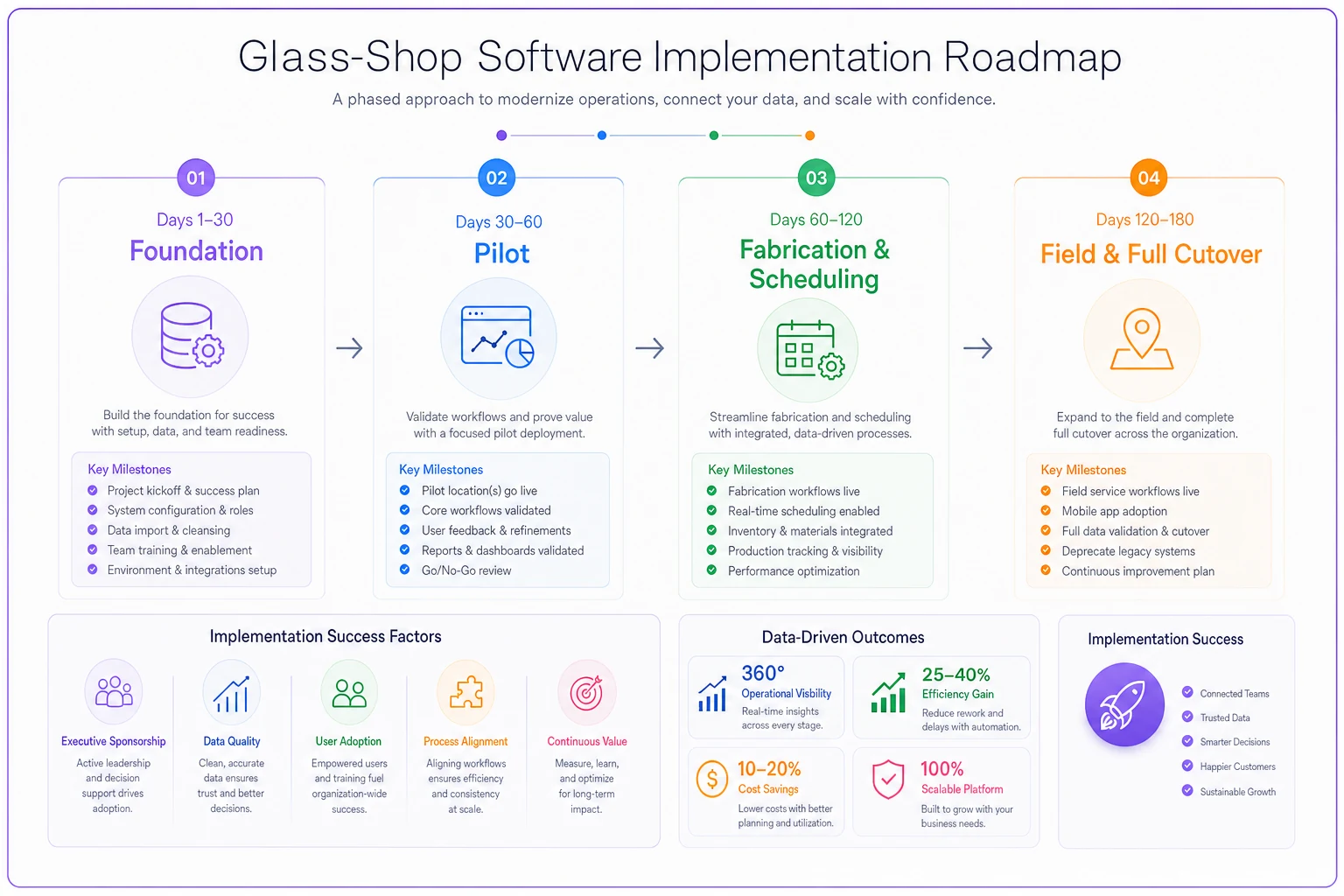
Rolling out glass-shop software fast and badly is how you end up running the old whiteboard and the new system for a year. Sequence it.
-
Days 1–30 — Foundation. Clean and import your inventory catalog (thickness, coatings, sheet sizes). Set up your pricing rules and configuration logic. Don't migrate ten years of job history — migrate what you'll actually reference. Pick one product line or job type as your pilot.
-
Days 30–60 — Pilot the core workflow. Run quoting and order entry for the pilot line through the new system while the old process still backs you up. Get the estimating logic matching reality. This is where you catch the "it priced the low-E wrong" problems before they hit every job.
-
Days 60–120 — Fabrication and scheduling. Bring in cut optimization and, if you temper, the oven scheduling. Validate the CNC export on real parts before trusting it on live jobs. Train the floor on the new nest output. Expect friction here — the shop floor is where adoption lives or dies.
-
Days 120–180 — Field, reporting, and full cutover. Roll out field measurement and change-order capture to crews. Stand up your KPI reporting. Retire the parallel process once a full job cycle runs cleanly through the system.
Quick-win KPIs to prove it's working
-
Material yield % — the fastest win from optimization; climbing from the 50s into the 70s–80s is realistic and obvious.
-
Quote turnaround time — hours to minutes on standard configs.
-
Remake / breakage rate — should trend down as measurement and spec errors drop.
-
On-time delivery % — the install side's scoreboard.
-
Margin variance (quote vs. actual) — the number that tells you whether estimating is finally honest.
Pick one product line or job type as your pilot to limit scope and surface integration problems quickly.
Track these monthly, not quarterly. If yield isn't moving within the first 60 days on the lines you've migrated, something in the optimization setup is off and you want to catch it early.
A Realistic Scenario
A mid-size fabrication shop — around 18 people, roughly $4M in annual revenue, running an oven and a couple of CNC tables — was quoting in spreadsheets and scheduling tempering on a whiteboard. Their recurring pain: material yield sat in the low 60s on manual nesting, and roughly one job in twelve had a spec or measurement error that forced a remake.
After moving to a glass-aware platform with real cut optimization and oven scheduling, yield climbed into the high 70s within the first couple of months on the lines they'd migrated. Quote turnaround on standard shower and storefront configs dropped from "we'll get back to you tomorrow" to same-hour. The remake rate didn't disappear, but it came down noticeably once field measurements fed the order directly instead of getting transcribed twice.
The interesting part wasn't any single number. It was that the floor manager stopped spending his first hour every morning rebuilding the oven schedule — that hour went back to actually running the floor. Those recovered hours rarely show up in a sales deck, but they're often the real payback.
The Short Version
Buying glass-shop software goes wrong when you evaluate it like generic ERP. Decide your profile first — fabricator, installer, or retail/wholesale — because it reorders your entire priority list. Insist that vendors demonstrate the glass-specific hard parts live: configuration-based estimating, remnant-aware cut optimization, oven scheduling as a real constrained resource, and a clean CNC handoff to your machines.
Price the full 24–36 month cost, not the sticker. Sequence your rollout so the shop floor sees a win early instead of a year of parallel systems. Do that, and you'll skip the six-month mistake most shops only discover after the ink is dry.
Price the full 24–36 month cost, not the sticker. Sequence your rollout so the shop floor sees a win early instead of a year of parallel systems. Do that, and you'll skip the six-month mistake most shops only discover after the ink is dry.
Ready to elevate your business intelligence?
Join 2,500+ businesses leveraging Glasaly to drive smarter decisions, improve team alignment, and boost operational performance.