

Access control in analytics almost never fails loudly. It fails in slow, quiet accumulation. Someone gets read access to a revenue schema for a one-off project in Q1, and eighteen months later they've left the finance team, joined marketing, and still have it. Multiply that by 40 people and three years, and you end up with an access map that nobody can explain and nobody wants to touch.
That's the real problem with analytics access. Not that companies lack rules — it's that the rules were designed for the moment they were written, and analytics organizations don't sit still. Roles shift, warehouses get added, someone spins up a new BI tool, a contractor needs "temporary" access to a table with customer emails in it. An analytics access operating model is what keeps this from turning into an untraceable mess — a set of standing rules for who gets what, how PII gets found and flagged, how access gets reviewed, and what happens when something goes wrong.
This isn't a security-team problem. In most small and mid-sized data teams, there is no dedicated security person. The analysts and the ops manager own it whether they want to or not. So the model has to be something analysts can actually operate — not a 60-page policy that lives in a wiki and gets read once.
Why access sprawl is a structural problem, not a discipline problem
The instinct is to blame sloppiness. Someone granted too much, someone forgot to revoke. But the pattern is too consistent across too many teams to chalk up to individual carelessness.
Access requests almost always arrive with urgency attached — a deadline, a launch, an exec asking a question. Denying or narrowing the request has an immediate cost (someone is blocked) while granting too much has a delayed, invisible cost that shows up months later, if ever. Every rational person under deadline pressure grants generously. The incentive structure quietly manufactures over-permissioning.
Then there's the warehouse problem. A team starts on one platform, adds a second for a specific workload, keeps the first around because migrating is painful. Now access has to be managed in two places with two different permission models, and the mental map of "who can see what" splits in half. If you've dealt with running multiple platforms, you know this is where governance gets genuinely hard — the same person can have wildly different effective permissions depending on which tool they log into.
And PII moves. This is the part people underestimate. A customer email lives in one clean, well-governed table. Then an analyst joins it into a working table for a campaign analysis, exports a slice to a shared sheet, builds a dashboard on top. The email address is now in four places, three of which nobody is governing. The original access controls were correct. The data leaked sideways through normal analytical work.
None of these are discipline failures. They're what happens when a fast-moving analytics function meets access rules that assume things hold still.
What breaks as you scale
At five people, informal access works fine. Everyone knows what everyone's doing, and if something's wrong someone notices. The model starts breaking somewhere around fifteen to twenty-five people, and the breaks are predictable.
Stop missing critical business insights.
Glasaly helps you create, share, and track interactive dashboards effortlessly.
- Real-time data visualization
- Collaborative report sharing
- Customizable analytics widgets
No credit card required
-
Nobody can answer "who can see customer PII?" in under a day. The question requires manually checking multiple systems, and the answer is different by the time you finish.
-
Access reviews become theater. Someone exports a permissions list, everyone rubber-stamps their reports' access because revoking might break something, and nothing actually changes.
-
Onboarding and offboarding drift apart. New hires get access quickly because there's pressure to unblock them. Leavers get deprovisioned slowly, if at all, because there's no pressure at all.
-
Incidents have no owner. When a report accidentally exposes something it shouldn't, there's a scramble to figure out who's responsible, what got exposed, and whether it needs to be disclosed. The scramble is the cost.
A concrete version of this: a mid-sized e-commerce operation, roughly 30 people on data and ops, discovered during a routine vendor security questionnaire that they couldn't produce a list of everyone who could query tables containing customer addresses. It took two analysts about a week and a half to assemble the answer, and the answer was worse than expected — around 22 people had access, of whom maybe 8 actually needed it. Nobody had done anything wrong. The access had just accumulated.
The access matrix: the core artifact everything else hangs on
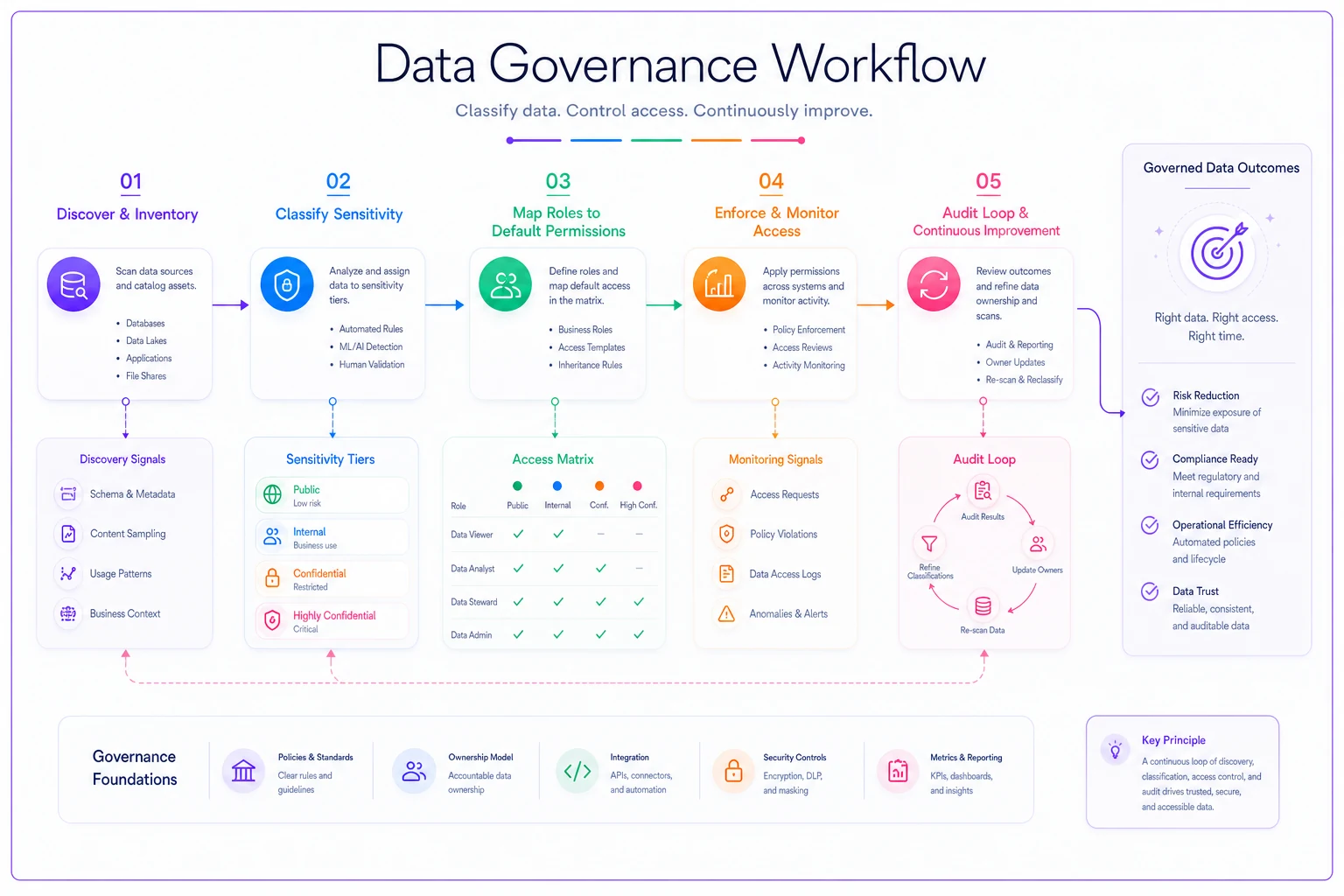
The center of a working operating model is a single, maintained access matrix. Not a policy document — a table that maps roles to data sensitivity tiers and states the default access for each combination.
Stop thinking about access per-person and start thinking about it per-role against data classified by sensitivity. Classify your data into a small number of tiers — three or four, not twelve. Then define what each role gets by default.
The point of the matrix isn't the specific cells — yours will differ. The point is that access becomes a consequence of role plus data tier, not a series of individual decisions made under deadline pressure. When someone asks for access, the question shifts from "should I grant this?" to "does their role justify this tier?" That's a much easier question to answer consistently, and it's auditable.
A quick visual can make the flow from classification to role-based grants obvious to stakeholders.
| Role | Public / operational data | Internal business data | Sensitive (contains PII) | Restricted (financials, health, auth) |
|---|---|---|---|---|
| Analyst (general) | Read | Read | Masked / column-limited | None |
| Senior analyst | Read | Read | Read (logged) | Request-based |
| Ops manager | Read | Read | Read (logged) | None |
| Data engineer | Read/Write | Read/Write | Read/Write (logged) | Read/Write (logged) |
| Contractor / temp | Read (scoped) | Scoped by project | None by default | None |
| Executive / viewer | Read (dashboards) | Read (dashboards) | Aggregated only | Aggregated only |
A common mistake: making the tiers too granular. If you have a dozen sensitivity levels, nobody classifies data correctly and the matrix collapses. Three or four tiers that people actually understand beat a precise taxonomy that nobody applies.
The matrix also gives you a clean handoff to how you manage datasets more broadly. If you treat your important datasets as products with clear owners and contracts — which is worth doing regardless — the work of making datasets product-ready pairs naturally with access classification. A dataset that already has an owner and a documented contract is far easier to assign a sensitivity tier to.
Finding the PII you don't know you have
You can't govern what you can't find, and most teams don't have a full map of where their PII actually lives. The clean source tables are known. The derived tables, the analyst working schemas, the exported extracts — that's where PII quietly spreads.
-
Scan column names first. A surprising amount of PII is discoverable by pattern-matching column names:
email,phone,ssn,dob,address,first_name. Run this across every schema, including the messy analyst working areas. It's crude but catches most of it. -
Sample and pattern-match values. Column names lie. A column called
notesmight contain email addresses typed by hand. Sample a few hundred rows per column and run regex checks for email, phone, and card-number patterns. This catches PII hiding in free-text fields. -
Trace the lineage of known PII columns. Take your confirmed PII columns and follow where they flow — which tables join against them, which dashboards read them. This is how you find the four copies of a customer email you didn't know existed.
-
Flag and classify what you find. Every discovered PII location gets tagged with its sensitivity tier and an owner. Now the access matrix has something concrete to apply to.
-
Re-run on a schedule. New tables appear constantly. A discovery scan that runs weekly or monthly catches the sprawl before it accumulates for a year.
The highest-risk PII is almost never in the well-governed source tables. It's in the ungoverned middle layer — the working tables analysts build and forget about. That's exactly where your discovery scan should be most aggressive, because that's the layer with the weakest access controls.
Audit checklists analysts can actually run
Audits fail when they're too big to do regularly. A quarterly audit that takes a week gets skipped or rushed. The fix is to make audits small, frequent, and specific enough that an analyst can run one in an afternoon.
-
Every access grant is traceable to a role justification. Pull the current permissions list and confirm each grant maps to a role in the matrix. Flag anything that doesn't.
-
No orphaned access. Cross-check active users against the current org roster. Anyone with access who has left or changed teams gets flagged for removal.
-
Temporary access has actually expired. Every "temporary" grant should have had an end date. Confirm the expired ones are gone. If your grants don't have end dates, that's the first thing to fix.
-
PII tiers match reality. Spot-check a few PII-classified tables and confirm the people with access still need it.
-
New tables since last audit are classified. Anything created since the last check gets a sensitivity tier and an owner.
-
Restricted-tier access is logged and reviewed. Every access to financial or auth-related data should be logged. Skim the logs for anything that looks off.
The discipline that makes this work: default deny with expiry. Grants without an expiry date are the ones that become orphans. If every non-standing grant expires by default and has to be renewed, the audit shrinks dramatically because the system cleans up after itself. You're auditing the exceptions, not the entire population.
Ensure all non-standing grants have expiry dates so audits focus on exceptions rather than the whole population.
This kind of recurring operational ritual works best when it's part of how the data function runs as a service rather than a special event. Teams that have already structured analytics as an internal service with defined SLAs and roles tend to find the audit slots in naturally — it becomes one more scheduled responsibility with a clear owner, not an annual fire drill.
Incident runbooks: what to do when something leaks
The moment you need a runbook is the moment you have the least capacity to think. An access incident — a dashboard exposing PII to the wrong group, an over-broad grant discovered, an export that went somewhere it shouldn't — triggers panic, and panic produces bad decisions. The runbook exists so the response is mechanical.
-
Contain. Revoke the access or take down the exposed resource first. Investigate second. The instinct to understand before acting costs you exposure time.
-
Scope. Determine exactly what was exposed, to whom, and for how long. Your PII map and access logs make this fast — this is the payoff for having done the discovery and logging work.
-
Assess disclosure obligations. Some exposures trigger legal notification requirements. Have a pre-decided threshold and a named person who makes this call, so it's not being debated mid-incident.
-
Remediate. Fix the root cause, not just the symptom. If a dashboard exposed PII, the question isn't just "who saw it" but "how did PII get into a dashboard that group could access."
-
Postmortem. Write down what happened, why, and what changes. Feed anything systemic back into the access matrix or the discovery scan.
Nearly every access incident traces back to something the audit should have caught but didn't, or to a control that existed but wasn't enforced. The postmortem's real job is closing that gap, not assigning blame. Access incidents are systemic almost every time — the runbook should reflect that.
Consent flows without heavy infrastructure
Consent is the part small teams handle worst, because proper tooling is expensive and the requirements feel abstract until a customer asks to be deleted. But you can build a workable consent layer without a dedicated platform.
The core idea: maintain a consent-state table keyed to customer identity, recording what each customer has agreed to and when. Every downstream use of PII checks against this table. When a customer withdraws consent or requests deletion, you update one authoritative place and — critically — your PII map tells you every other place their data lives so you can propagate the change.
When a lightweight consent flow makes sense: you handle customer PII but you're not in a heavily regulated vertical, and you need defensible, honest consent handling without enterprise budget. This describes most small and mid-sized businesses.
When it's a bad idea: if you're in healthcare, finance, or handling data across strict regulatory regimes, the lightweight version isn't enough. The compliance requirements are specific enough that you need proper tooling and legal review. Don't improvise regulated consent.
Who should not build this yet
Not every team needs a formal access operating model, and building one prematurely wastes effort.
Under roughly ten people where everyone genuinely knows what everyone touches, a full matrix and audit cycle is overhead you don't need. Informal review works while the team is small enough to hold in your head. Put the effort into good data-tier classification early — that's cheap and pays off later — but skip the heavy audit machinery for now.
The teams that most need this are the ones in the 20-to-50 range who've already felt the pain: the vendor questionnaire nobody could answer, the leaver who kept access for months, the dashboard that showed the wrong people something sensitive. If any of those have happened, the informal model has already broken and you're just not paying the bill yet.
A real scenario
A subscription-box company, around 35 people with maybe a dozen touching data regularly, hit the wall during a partnership deal. The partner's security review asked for a list of everyone who could access customer PII and evidence of access reviews. They had neither.
Before: no access matrix, permissions spread across a warehouse and a BI tool, no PII map, and "temporary" contractor access from a project six months earlier still live. Assembling the PII access list took two people the better part of two weeks, and they found roughly 18 people with access to customer email and shipping addresses where about half had any current need.
They spent about a month building the basics — a four-tier data classification, a role-based access matrix, a column-name-plus-sampling discovery scan, and a monthly audit checklist owned by one senior analyst. The discovery scan found customer PII in around nine tables they hadn't known contained it, mostly analyst working tables from old projects.
After: the next security questionnaire took an afternoon instead of two weeks. Orphaned access dropped to near zero because every non-standing grant now expired by default. The monthly audit runs in roughly two to three hours. It wasn't a dramatic transformation — it was the difference between not being able to answer a basic question about their own data and being able to answer it in an afternoon.
The connective tissue
Access, PII discovery, audits, incidents, and consent aren't five separate problems. They're one system with a shared backbone: knowing what data you have, how sensitive it is, and who can touch it. The access matrix depends on data classification. Audits depend on the matrix. Incident response depends on the PII map and access logs. Consent depends on the PII map too. Break any one and the others degrade.
The teams that handle this well aren't the ones with the biggest security budgets. They're the ones who treat access as an ongoing operational discipline rather than a one-time setup — the same way they'd treat data quality or observability with a real SLO framework. It's a running system with owners, schedules, and rituals, not a policy that gets written and forgotten.
Build the backbone once, keep the discovery scan and audit running, and the model quietly does its job in the background — which is exactly where good access control belongs.
Ready to elevate your business intelligence?
Join 2,500+ businesses leveraging Glasaly to drive smarter decisions, improve team alignment, and boost operational performance.