

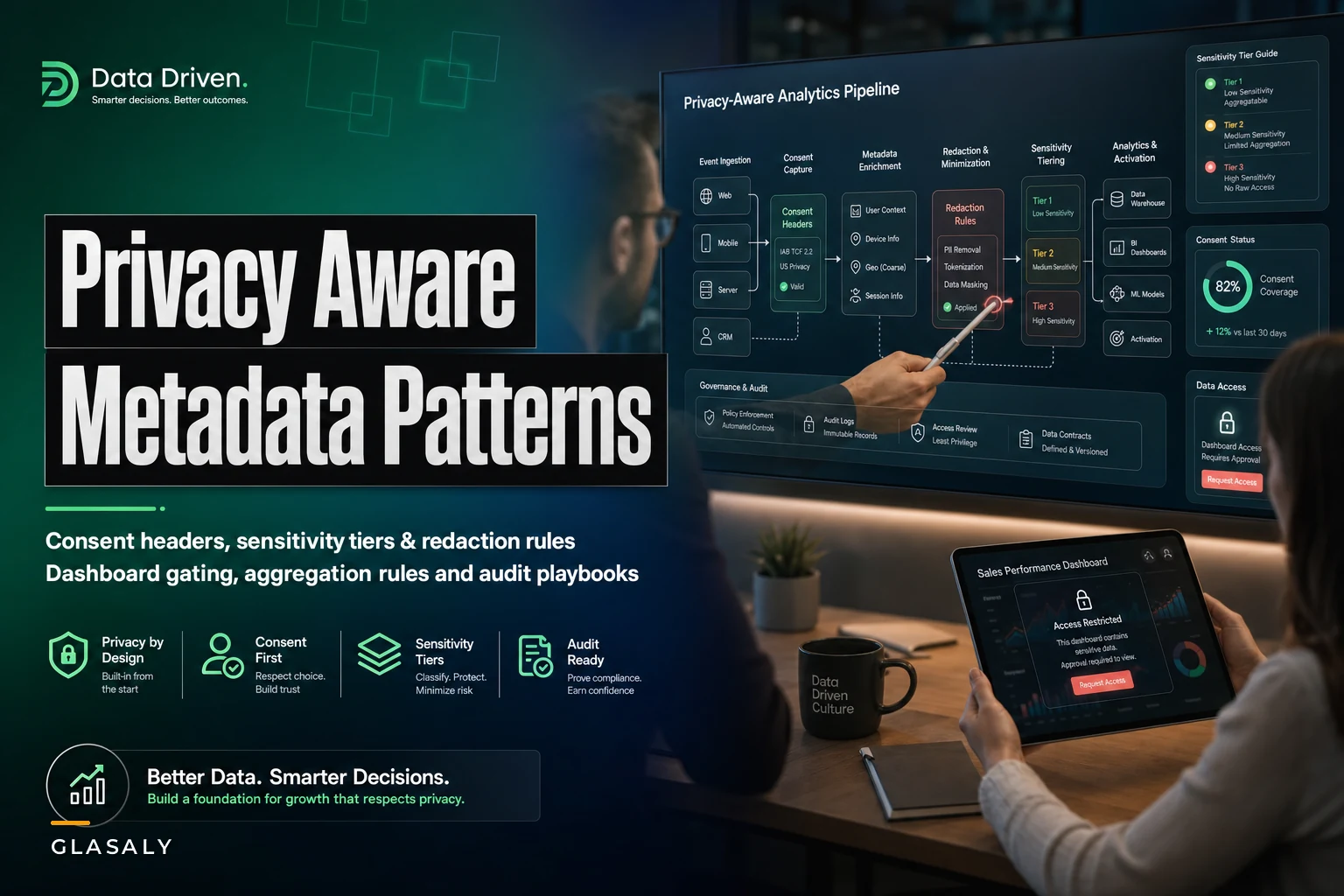

Most analytics teams don't have a privacy problem until the day they suddenly have a very big one. Someone in legal asks whether the email engagement dashboard includes users who opted out of marketing tracking. Nobody knows. The dashboard pulls from an events table, the events table is fed by three ingestion jobs, and none of them carry a consent flag past the first hop. So the answer becomes a two-week manual audit that nobody wanted to run.
That gap — consent and sensitivity signals getting dropped somewhere between collection and the dashboard — is the most common privacy failure I see in analytics stacks. Not malicious data handling. Just metadata that falls off the truck on the way to the warehouse.
This post is narrow on purpose. It's about the metadata patterns that keep consent and sensitivity tags attached to your data as it flows, and how to do it without ripping out your existing pipeline. No new platform, no six-month re-architecture. Mostly columns, conventions, and a handful of enforced rules.
Where the signal actually gets lost
Walk the path a single event takes and you'll usually find three or four spots where privacy context evaporates.
A user interacts with your product. The frontend SDK captures a consent state — say, analyticsok: true, marketingok: false. That state exists at the moment of collection. Then the event hits your ingestion layer, gets flattened into a wide events table, and the consent object gets dropped because nobody downstream asked for it. By the time an analyst builds a cohort, the row looks identical whether the person consented to everything or almost nothing.
The second leak happens in aggregation. A nightly job rolls raw events into daily summary tables. If the consent flag isn't a grouping key or a filter, the aggregate silently blends consented and non-consented records together. Now the summary table is contaminated and there's no way to un-blend it.
The third leak is sensitivity. A column like zipcode or dateofbirth starts life clearly sensitive, but once it's joined into a reporting view with a friendly alias like region or ageband, the sensitivity classification is gone. The next analyst who copies that view into a dashboard has no idea they're exposing something that should've been bucketed.
What makes this hard isn't the technology. It's that consent and sensitivity are attributes of the data that your tooling treats as optional baggage. The fix is to make them non-optional — give them a defined home at every stage.
The core pattern: consent headers that travel with the data
The cleanest approach is treating consent like an HTTP header that rides along with every record, not like a lookup you do later.
Stop missing critical business insights.
Glasaly helps you create, share, and track interactive dashboards effortlessly.
- Real-time data visualization
- Collaborative report sharing
- Customizable analytics widgets
No credit card required
consent: { version: "2024-03", analytics: true, marketing: false, personalization: true, captured_at: "2024-03-11T14:22:09Z" }
The version matters more than people expect. Consent policies change. When you update your consent banner wording, you bump the version. Six months later when someone asks "which policy did this user agree to," the answer is sitting in the row instead of in a legal doc nobody can map to data.
The rule that makes this work: every table that holds user-level data must carry a consent column, and every job that reads user-level data must preserve it. It sounds obvious and it's violated constantly, because the default behavior of most transforms is to select only the columns someone explicitly needed that day.
To enforce it cheaply, add a schema check to your transformation layer: if an input table has a consent column and the output doesn't, the job fails. You don't need a governance platform for this — a column-presence assertion in your dbt tests or your CI pipeline does the job. This fits neatly into the kind of least-privilege and audit discipline covered in the analytics access operating model, where the goal is making the safe path the default path.
Here's a simple workflow showing consent captured, preserved through ingestion and preserved in transforms.
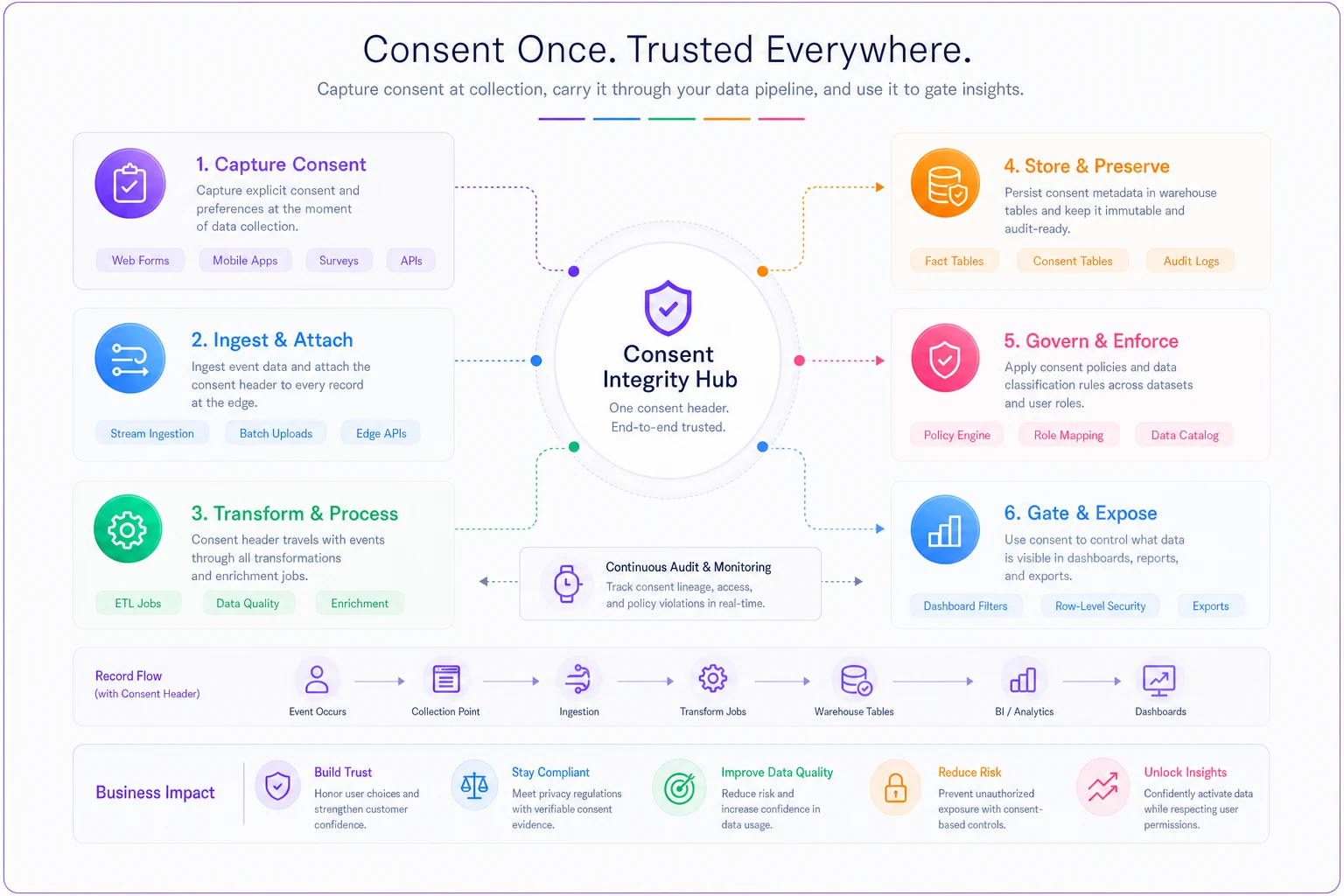
This pattern treats consent as first-class metadata that must be preserved by every transform so downstream consumers don't have to reconstruct or guess it.
Sensitivity tiers: stop arguing field by field
Sensitivity debates stall out because people try to classify every column individually, forever. A tiered system cuts that off. You define three or four tiers, assign each column once, and then your redaction rules key off the tier instead of the field name.
| Tier | What it covers | Default dashboard behavior | Example fields |
|---|---|---|---|
| T0 – Public | Non-personal, safe to expose anywhere | Show raw | product category, order status, region rollups |
| T1 – Internal | Business data, not personal | Show to authenticated internal users | revenue, conversion rate, cohort counts |
| T2 – Personal | Identifies or relates to a person | Aggregate-only, min group size enforced | email, userid, deviceid, zip |
| T3 – Sensitive | Special-category or regulated | Blocked from dashboards; access via request | health flags, precise geo, payment details |
The point of tiers isn't precision — it's that a new field only needs one decision: which bucket. Then it inherits a whole set of behaviors automatically. When an analyst adds a column, they tag it. If they don't tag it, your pipeline treats it as T3 by default, which is annoying enough that people tag things promptly.
Store the tier as table-level metadata (a YAML sidecar or a catalog annotation) so the tier is queryable.
That way the tier is queryable. You can write a check that says "no T2 or T3 column appears in a view marked dashboard_ready" and run it on every deploy. Treating datasets as products with explicit contracts — the approach described in making datasets product-ready — makes the tier just one more field in the contract rather than tribal knowledge.
Redaction and aggregation rules, tied to tiers not to tables
Once tiers exist, redaction stops being a per-dashboard improvisation and becomes a rule set.
The three rules that cover most real situations:
-
Minimum group size for any T2 aggregate. If a grouped result would expose a bucket with fewer than N users (usually start around 25, tune from there), suppress or merge that bucket. This is what stops a "region + age + gender" breakdown from accidentally pointing at one identifiable person.
-
Hashing or tokenizing T2 identifiers before they leave the raw layer. The join still works on the token. The human-readable value never reaches the reporting tables.
-
Hard block on T3 in any self-serve surface. Not redacted, not aggregated — absent. T3 access goes through an explicit request flow with a logged reason.
A concrete example of why minimum group size matters: a subscription business built a churn dashboard sliced by plan, city, and signup month. Most cells were fine. But "Enterprise plan, Boise, March signups" contained exactly two accounts, and one had just churned. Anyone looking at that cell could effectively identify the customer. The min-group-size rule would have collapsed that cell into "Enterprise / other" automatically. Nobody caught it for weeks because the rule lived in nobody's head.
The thing about redaction applied at the dashboard layer — it's always too late and always incomplete, because there are more dashboards than you can police. Apply it at the aggregation layer — the point where raw becomes reportable — and every downstream consumer inherits it for free.
Dashboard exposure rules
Exposure rules are where consent and sensitivity finally meet the viewer. Two questions decide what a dashboard can show:
-
Does the underlying data respect consent scope? A marketing-performance dashboard must only include records where
consent.marketing = true. That filter belongs in the model, not in a note telling analysts to remember. -
Does the view's tier match the audience's clearance?
The practical move is to label each dashboard with an exposure class that maps to tiers. A dashboard tagged exposure: internal-aggregate can only be built on T0/T1 columns plus T2 columns that have passed through the aggregation rules. If someone tries to drop a raw email column onto it, the build check rejects it.
Where teams get this wrong: they handle consent filtering once, when the dashboard is first built, then forget it. Months later someone adds a new data source to the same dashboard and the consent filter doesn't cover the new source. The dashboard now mixes consented and non-consented data again. The fix is making the consent filter a property of the model feeding the dashboard, so any new source has to pass through the same gate.
When this level of rigor actually makes sense
-
You handle personal data for users in regulated regions
-
Multiple teams build their own dashboards off shared tables
-
You've already had one "wait, does this include opted-out users" fire drill
When it's overkill
If you're a five-person team with one internal dashboard and no personal data beyond an internal user ID, a single T2 flag and a consent column is plenty. Building a four-tier taxonomy for that is bureaucracy for its own sake. Start with the consent column that travels and one sensitivity flag. Add tiers when the pain shows up.
A workable rollout sequence
You don't boil the ocean. The order that keeps the project shippable:
-
Add the consent column to your raw user-level tables first. Even if nothing downstream uses it yet, start capturing and preserving it so you have history.
-
Write the column-presence check that fails any transform dropping consent. This locks the gain in place before anyone forgets.
-
Classify your top 20 columns into tiers. Not all of them — the ones that actually appear in dashboards. That covers most of your exposure.
-
Implement min-group-size suppression in your aggregation jobs for T2 columns.
-
Tag existing dashboards with exposure classes and run the tier-mismatch check retroactively. Expect to find a few violations. That's the point.
-
Stand up the T3 request flow last, since it's the lowest-volume, highest-sensitivity path.
Most teams can get through steps 1 through 4 in a few weeks because none of them require new infrastructure — they're columns, conventions, and assertions layered onto what you already run.
The audit-playbook template
When the question comes — and it will — you want to answer in hours, not weeks. The playbook that makes audits boring:
-
Consent coverage query For any dataset, report the percentage of rows carrying a valid consent object and the version distribution. A sudden drop in coverage means a leak somewhere upstream.
-
Tier inventory A single query that lists every column in every dashboard-ready view alongside its tier. Any untagged column shows up as T3-by-default and flags for review.
-
Exposure reconciliation For each live dashboard, list its exposure class and confirm every source model satisfies it. Mismatches get an owner and a deadline.
-
T3 access log Who requested special-category data, when, why, and whether access was revoked after use.
Keep these as saved queries, not as a document someone updates by hand. A document goes stale the day after it's written. A query re-runs on demand and always reflects reality.
A real scenario
A mid-sized ecommerce operation — roughly 200k monthly active users, a lean three-person data team — got a request from their newly-hired privacy counsel: prove that the email campaign performance reports excluded anyone who had opted out of marketing. They couldn't. The consent state was captured at signup but never carried into the events tables feeding those reports. The honest answer was "we think it's mostly fine," which is not an answer legal accepts.
The fix took about three weeks of part-time work, not a replatform. They added a consent column to the two raw tables that fed reporting, wrote a preservation check so no transform could drop it, classified the fourteen columns that actually appeared in customer-facing and internal dashboards into three tiers, and added min-group-size suppression to their nightly aggregates. The consent filter moved into the shared model layer instead of living in individual dashboard notes.
The outcome wasn't dramatic in a demo-worthy way, and that's sort of the point. The next time counsel asked a coverage question, the answer came back the same afternoon from a saved query: around 98% consent coverage, two dashboards flagged for a stale filter, both fixed within a day. The fire drill became a routine check. They also caught two small-cell exposure cases nobody had noticed, including one cohort breakdown that was effectively naming individual customers.
What to take from this
Privacy-aware analytics isn't about adding a compliance layer on top of your stack. It's about refusing to let consent and sensitivity metadata fall off as data moves. The signal exists at collection — the whole game is keeping it attached.
The patterns that do the work are unglamorous: a consent object that travels like a header, a small set of sensitivity tiers that default to strict, redaction applied at aggregation instead of at the dashboard, and exposure rules enforced by build checks rather than good intentions. None of it requires new infrastructure. Most of it is columns and assertions bolted onto pipelines you already have.
The teams that handle this well aren't the ones with the biggest privacy budgets. They're the ones who made the safe path the default path, so that doing the right thing with data is just how the pipeline works — not a special project someone has to remember to run.
Privacy-aware analytics isn't about adding a compliance layer on top of your stack. It's about refusing to let consent and sensitivity metadata fall off as data moves. The signal exists at collection — the whole game is keeping it attached.
The patterns that do the work are unglamorous: a consent object that travels like a header, a small set of sensitivity tiers that default to strict, redaction applied at aggregation instead of at the dashboard, and exposure rules enforced by build checks rather than good intentions. None of it requires new infrastructure. Most of it is columns and assertions bolted onto pipelines you already have.
Ready to elevate your business intelligence?
Join 2,500+ businesses leveraging Glasaly to drive smarter decisions, improve team alignment, and boost operational performance.