



The worst part of late-arriving data isn't the lateness. It's what happens after the late records land. A batch of yesterday's transactions shows up at 2pm today, someone reruns a job, and suddenly a number that three teams already screenshotted, quoted in a standup, and pasted into a board deck is now different. Nobody gets notified. The old number and the new number both exist somewhere. And when finance asks why revenue for Tuesday changed between two reports, you spend an afternoon reconstructing what happened instead of doing actual work.
This is a solvable problem, but only if you treat it as an operational rules problem rather than a "we'll fix it when it breaks" problem. Late-arriving data strategies aren't about eliminating lateness — you can't. They're about making lateness deterministic: predictable ingestion boundaries, explicit rules for when a backfill is allowed to touch published numbers, and a clear way to tell downstream consumers that something changed and why.
Where late data quietly corrupts everything
The mechanics are almost always the same. Your pipeline has a schedule. The schedule assumes source data is complete at some cutoff. But upstream systems don't respect your cutoff.
A few real patterns:
-
A payments processor settles transactions in batches, and refunds from Saturday don't post until Monday afternoon.
-
A POS system in a store with spotty wifi buffers sales locally and syncs when the connection comes back — sometimes 6 hours later, sometimes the next morning.
-
A third-party logistics partner sends shipment confirmations via a nightly file that occasionally arrives at 5am and occasionally at 11am.
-
An event-tracking SDK drops mobile events into a queue, and offline users' events trickle in for 48–72 hours after the event "happened."
None of these are bugs. They're the normal behavior of systems you don't control. The failure is on your side: your pipeline treats "the data I have at run time" as "all the data that exists for that period." When the rest arrives, you either ignore it (undercount forever) or reprocess it (change published numbers with no trace).
A typical example looks like this. An ops team runs daily revenue at 6am off the previous day's transactions. On a normal day, roughly 2–3% of transactions for "yesterday" haven't settled yet. Nobody notices because 2–3% is inside the noise. But on the first business day after a long weekend, that number jumps to 15–20% because three days of delayed settlements land at once. The Monday report undercounts badly, someone reruns it Tuesday, and now Monday's "revenue" has two versions living in two Slack threads.
Watermarking: the thing most pipelines skip
A watermark is just a recorded boundary: as of this timestamp, I am treating data up to this event-time as complete. It's the single most useful concept for late data, and most homegrown pipelines don't have one.
Stop missing critical business insights.
Glasaly helps you create, share, and track interactive dashboards effortlessly.
- Real-time data visualization
- Collaborative report sharing
- Customizable analytics widgets
No credit card required
There are two timestamps that matter for every record, and conflating them is the root cause of most late-data pain:
| Timestamp | What it means | Why it matters |
|---|---|---|
| Event time | When the thing actually happened (sale rung up, refund issued) | This is what your metrics should be grouped by |
| Ingestion time | When your pipeline received the record | This is when you could have known about it |
Late-arriving data is simply any record where ingestion time is meaningfully after event time. Once you record both, you can answer questions you couldn't before: how much of Monday's revenue did we actually know about at 6am Tuesday? How much arrived after?
-
For each partition (usually a day), you track the maximum event-time you've committed as "settled."
-
When new records arrive with an event-time behind the watermark, they're flagged as late — you don't silently fold them into a closed period.
-
Late records go into an explicit reprocessing path with their own rules, instead of just rerunning the whole day and hoping.
The insight most teams miss: a watermark isn't a filter that throws data away. It's a marker that lets you distinguish "on-time" from "late," so you can handle each deliberately.
Store and version watermarks per partition so you can audit which data was considered "settled" at any publish time.
Without it, every rerun is a coin flip.
Acceptance windows: deciding when "done" means done
Once you can detect late records, you need a rule for how long you'll keep accepting them into a period before you declare it closed. That's your acceptance window.
The mistake people make is picking one window for the whole warehouse. Different sources have wildly different lateness profiles, and forcing them into a single policy either closes fast sources too slowly or corrupts slow sources by closing too early.
Set acceptance windows per source based on observed behavior. Look at the actual distribution of ingestiontime - eventtime over a few weeks, then pick a window that captures the vast majority of records without waiting forever for stragglers.
A realistic breakdown for a mid-sized retailer:
| Source | Typical lateness | Acceptance window | Close behavior |
|---|---|---|---|
| In-store POS | Minutes to 6 hrs | 24 hrs | Auto-close after 1 day |
| Card settlements | 1–3 days | 4 days | Auto-close after 4 days |
| Refunds/chargebacks | Up to 30 days | Soft window | Never fully close; restate monthly |
| Web analytics events | 0–72 hrs | 3 days | Auto-close after 3 days |
Two things worth calling out. First, some sources — chargebacks especially — genuinely never "close," so pretending they do is dishonest. You handle those with scheduled restatements, not a hard window. Second, the window is a business decision as much as a technical one. If leadership needs Monday's number by Tuesday 8am, you either accept that it'll be revised or you agree on a preliminary/final labeling scheme (more on that below).
When a short acceptance window makes sense
-
The downstream decision is directional, not exact (staffing, rough demand sensing).
-
The source is fast and rarely late by more than a few hours.
-
Speed matters more than precision, and consumers understand the number is preliminary.
When a short window is a bad idea
-
The number feeds financial reporting, payouts, or anything reconciled against an external system.
-
The source has a long, fat tail of lateness (refunds, insurance claims, offline events).
-
Consumers treat the number as final the moment they see it — which they will, unless you label it otherwise.
The window is a business decision as much as a technical one. If leadership needs Monday's number by Tuesday 8am, you either accept that it'll be revised or you agree on a preliminary/final labeling scheme (more on that below).
Backfill workflows that don't overwrite history
Backfills are where good intentions destroy trust. Someone notices a period was undercounted, reprocesses it, and the number changes with no record of the before-state. The next time anyone questions a figure, the whole team's numbers are suspect.
A backfill needs to be a controlled operation, not an ad-hoc rerun. The workflow that holds up:
-
Detect — the watermark/late-record flag surfaces that a closed period received new data past its acceptance window.
-
Scope — determine exactly which partitions and which metrics are affected. Don't reprocess the world; reprocess the specific days that changed.
-
Snapshot the current state — capture what the published numbers are before you touch them, so the change is reconstructable.
-
Recompute in place with a version marker — the corrected numbers get a new version tag, and the old version stays queryable.
-
Diff and threshold — compare old vs new. A 0.3% shift might auto-publish; a 12% shift should require a human to sign off before it goes live.
-
Publish with a label — the corrected period is marked as restated, with an effective date.
-
Notify consumers — anyone downstream of that metric gets told, with the magnitude and reason.
Steps 5 and 6 are the ones that separate teams that get trusted from teams that don't. Auto-publishing every recomputation is how you end up with numbers that jitter for no visible reason. The same version-control discipline that keeps metric definitions from breaking in production applies directly to restated data — treat a backfill like a change that needs review, not a routine rerun.
Here's a simple flow that maps to the steps above.
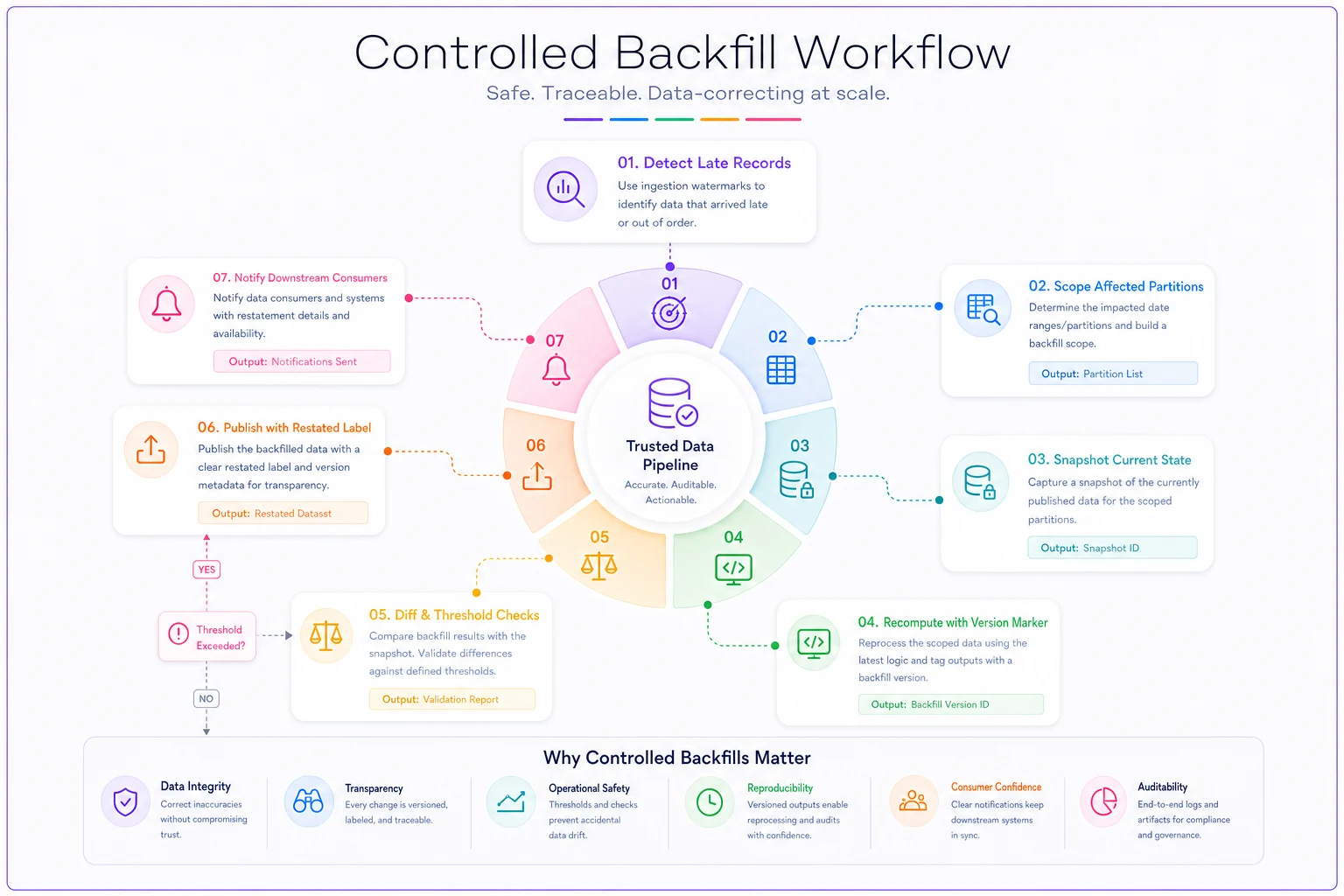
The same version-control discipline that keeps metric definitions from breaking in production applies directly to restated data — treat a backfill like a change that needs review, not a routine rerun.
Labeling retroactive changes so people can trust the number
If you change a published number, the consumer has to be able to tell. Annotation is cheap to do and expensive to skip.
At minimum, every metric that can be restated should carry:
-
Status —
preliminary,final, orrestated. -
As-of timestamp — when this version of the number was computed.
-
Version / revision number — so two reports quoting different values can be reconciled.
-
Restatement reason — short, human-readable ("late POS sync from Store 4," "refund batch posted").
-
Magnitude of change — old value, new value, delta.
The pattern that works well is a preliminary → final lifecycle. The 6am Tuesday number ships as preliminary. Once the acceptance window closes, it flips to final. If something changes after final, it becomes restated with a visible reason. Consumers learn quickly that "preliminary" means "will probably move a little" and "final" means "reconcilable." That one distinction eliminates most of the "why did this number change" fire drills.
A quick checklist for whether your labeling is actually usable:
-
[ ] Can a consumer tell at a glance if a number is preliminary or final?
-
[ ] Does every restated figure show what it was before?
-
[ ] Is the reason for the change readable by a non-engineer?
-
[ ] Can two people quoting different values figure out which version each used?
-
[ ] Is there a single as-of timestamp attached to the figure, not buried in a log?
If you can't check these, your numbers are technically correct and operationally untrustworthy — which is nearly as bad as being wrong.
Consumer notification templates
A restatement nobody hears about is almost worse than no restatement, because someone will keep using the stale number.
Keep the notification boring and structured. People need to know fast whether this affects their decision. Two templates cover most situations:
Minor auto-published correction (below threshold): > [Data notice] Restated: Daily Revenue, Oct 12 > Value updated from $48.2k → $49.1k (+1.9%). > Reason: card settlements from the weekend posted after the acceptance window. > No action needed — this is within normal late-settlement range. Version 2, as of Oct 15 09:00.
Material correction (above threshold, needed sign-off): > [Data correction — please review] Restated: October Refund Rate > Value updated from 2.1% → 3.4% (+1.3 pts). > Reason: a delayed chargeback batch (Store 4) was excluded from the original figure. > Affected reports: Monthly Margin deck, Ops weekly. If you've shared the prior figure externally, please note the correction. > Reviewed by: [name]. Version 3, as of Oct 16 14:20.
The difference in tone is deliberate. Minor corrections reassure ("no action needed"). Material ones prompt action and name who signed off. Sending the same generic alert for both trains people to ignore all of them.
Notifications like these pair naturally with automated quality checks — if you've already got automated transactional data-quality recipes with remediation handoffs running, the restatement notice becomes one more handoff in a system people already trust, rather than a one-off email someone remembers to send.
A real scenario
A regional coffee chain with about a dozen locations ran daily sales off their POS export every morning. Stores with weak connections synced late, so on any given day roughly 4–6% of the prior day's transactions weren't in the morning report. On busy weekends, some stores didn't fully sync until midday Monday.
The visible symptom was constant, low-grade distrust. District managers stopped believing the morning number because it "always went up later." Finance kept two spreadsheets. Someone was spending maybe half a day a week reconciling the versions and answering "why is this different" questions.
The fix wasn't fancy. They started recording ingestion time alongside event time, set a 24-hour acceptance window on the POS source, and shipped the morning number labeled preliminary with the final version publishing the next day. Backfills got a version tag and a one-line reason, and district managers got a short auto-notice only when a store's number moved more than a few percent.
The numbers didn't change much — that was the point. But the arguments about the numbers mostly stopped. Reconciliation dropped to under an hour a week, and the "why did this change" messages basically disappeared once everyone understood preliminary meant preliminary. The improvement was less about accuracy and more about people finally trusting what they were looking at.
Where to start
Don't try to build all of this at once. The highest-leverage first move is recording both timestamps — event time and ingestion time — on your most-disputed metric. That alone lets you see your lateness distribution, which tells you what acceptance window is realistic instead of guessing.
From there: pick your acceptance windows per source based on what you observe, add a preliminary/final label so consumers stop treating early numbers as gospel, and make backfills version their changes instead of overwriting them. The notification templates come last, but they're what converts a technically-sound pipeline into one people actually trust.
Late data will never stop arriving late. The goal isn't to fix that — it's to make sure that when it lands, nothing changes silently, and everyone who cares finds out in a way that tells them whether it matters.
Ready to elevate your business intelligence?
Join 2,500+ businesses leveraging Glasaly to drive smarter decisions, improve team alignment, and boost operational performance.